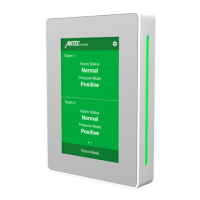
PMT - MANUAL
1 | PMT – Manual | AntecControls.com
TABLE OF CONTENTS
INTRODUCTION ..............................................................................................................................................................................1
General ..........................................................................................................................................................................................1
Product Overview..........................................................................................................................................................................1
Technical Specifications ................................................................................................................................................................2
GETTING STARTED WITH THE PMT ...............................................................................................................................................3
In the Box ......................................................................................................................................................................................3
Optional Accessories ....................................................................................................................................................................4
ELECTRICAL INSTALLATION ...........................................................................................................................................................5
Sample Wiring Diagram.................................................................................................................................................................5
Sensor Information Network (SIN) ................................................................................................................................................6
BACnet MS/TP Network ...............................................................................................................................................................7
MECHANICAL INSTALLATION ........................................................................................................................................................8
Installation and Mounting Instructions ..........................................................................................................................................8
DISPLAY NAVIGATION ...................................................................................................................................................................11
Initial Setup .................................................................................................................................................................................11
Home Screen ..............................................................................................................................................................................14
BACnet Point Monitoring ............................................................................................................................................................16
PMT Operation ............................................................................................................................................................................17
SETTINGS .......................................................................................................................................................................................18
Room Configuration ....................................................................................................................................................................19
Alarms .........................................................................................................................................................................................19
Inputs ..........................................................................................................................................................................................21
Outputs .......................................................................................................................................................................................25
Network.......................................................................................................................................................................................27
User Preferences ........................................................................................................................................................................28
Diagnostic....................................................................................................................................................................................29
About ...........................................................................................................................................................................................29
TROUBLESHOOTING .....................................................................................................................................................................30
Replacement Parts ......................................................................................................................................................................32
Technical Support ........................................................................................................................................................................32


 To Next Page
 Loading...