Need help?
Do you have a question about the Antec VP450 and is the answer not in the manual?
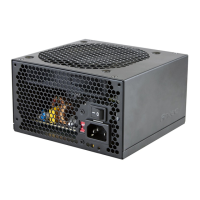
Details the VP450's focus on quality, performance, and value with quiet cooling and stable power.
Specifies compatibility with ATX12V v2.3/EPS12V v2.91 and 450W continuous power output.
Lists safety circuits like OVP, SCP, OPP, and OCP to protect the computer system.
Explains power distribution on separate rails and lists available power connectors.
Instructions for installing the VP450 PSU into the computer case using provided screws.
Guidance on connecting the 24(20+4)-pin main power connector to the motherboard.
Instructions for connecting the 8-pin or 4+4-pin connector for the CPU.
Details on connecting the 6-pin PCI-E connector to a graphics card.
Guidance for connecting SATA, Molex, and Floppy connectors to drives and accessories.
Steps for connecting the AC power cord and activating the PSU.
 General
| Model | VP450 |
|---|---|
| Type | ATX |
| Maximum Power | 450W |
| Efficiency | Up to 85% |
| 80 PLUS Certification | 80 PLUS Standard |
| Fan Size | 120 mm |
| Modular | No |
| SATA Connectors | 6 |
| Floppy Connector | 1 |
| Main Connector | 20+4 pin |
| CPU Connector | 4+4 pin |
| Input Voltage | 100-240V |
| Input Current | 6A-3A |
| MTBF | 100, 000 hours |
| Weight | 1.5 kg |
| Form Factor | ATX |
| +12V Output | 34A |
| Operating Temperature | 0°C to 40°C |
| Protections | OVP, OPP, SCP |
| Input Frequency | 50Hz-60Hz |
| Dimensions | 150mm x 140mm x 86mm |
| PCIe Connectors | 1x 6+2 pin |

 To Next Page