14. Threshold
15. Release
16. Attack
17. Makeup Gain
18. Compression Meter
19. Compression Curve
Show or Hide 16 x DSP Channel Strips
Clicking each bar reveals or hides 2 of the total 16 DSP FX channel strips.
18
7.4. Options Tab
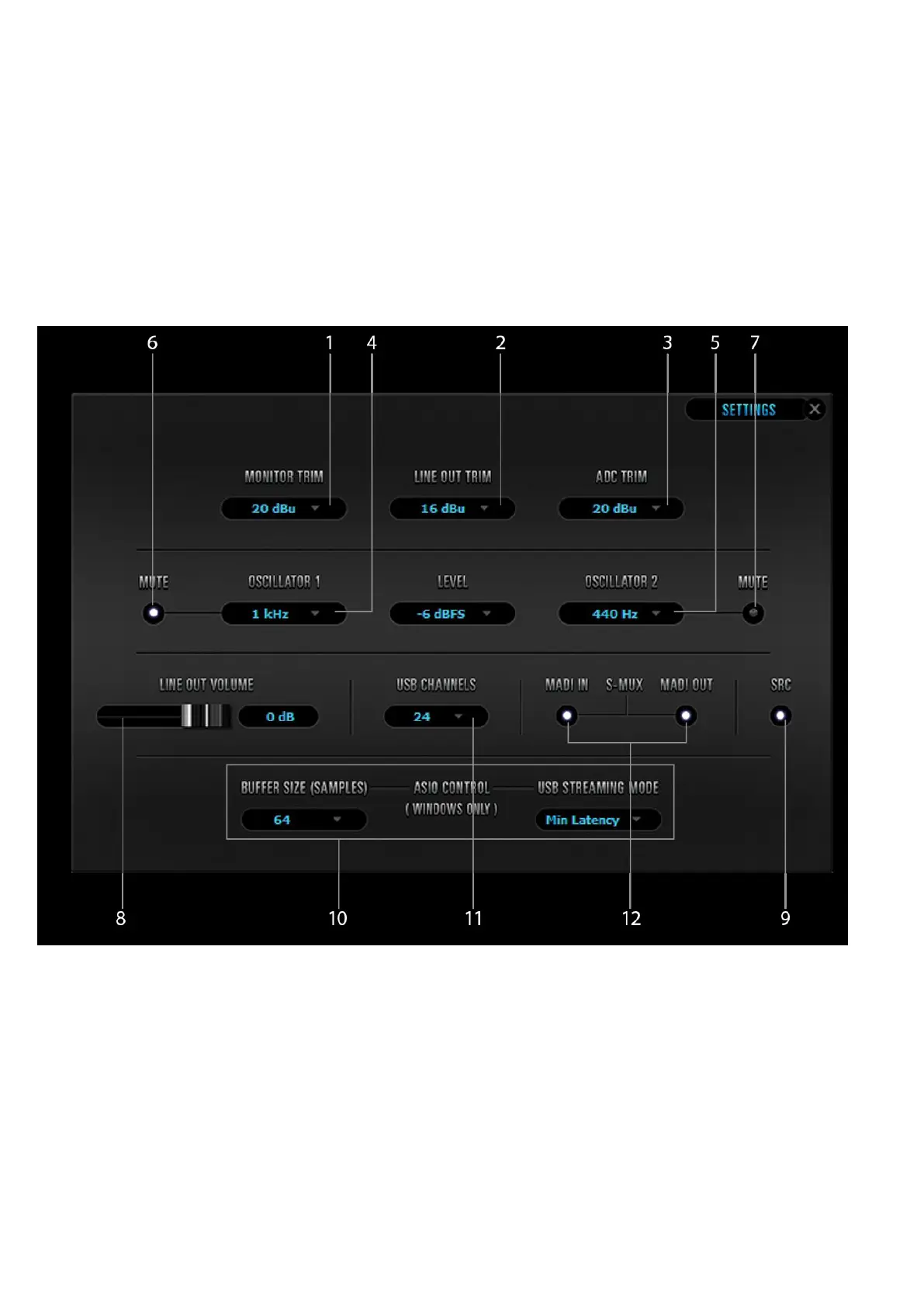
Click on the ‘Settings’ gear icon to open the ‘Settings’ window:
1. Monitor Trim
2. Line Out Trim
3. ADC Trim
4 & 6. Oscillator 1 and Mute
5 & 7. Oscillator 2 and Mute
8. Line Out Volume
9. SPDIF SRC
10. Windows, only: ASIO Control – Buffer Size & USB Streaming Mode
11. USB Channels Selector
12. MADI In S-Mux / MADI Out S-Mux












 To Next Page