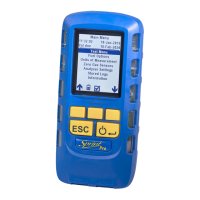
to edit password. Use the and keys to edit or create
a password as described above in Edit report header. Press
þ to accept change
and return to Password screen. Press ON/OFF/ENTER to store the change.
When a password has been created, Sprint will display the Supervisor pass-
word screen on entering Supervisor settings.
! .. / !"# $% & ' ( ) * + , - _ / A .. Z Uppercase alphabet
0 .. 9 0123456789 a .. z Lowercase alphabet
: .. @ :;<=>?@ Space
Tip: It is a good idea to enter your name/company name and phone number to identify the
instrument and then set a password to prevent others changing these settings.


 To Next Page