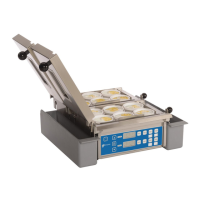
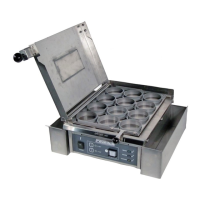
This document is the Owner's Manual for the Antunes Egg Station, Model ES-600R, with manufacturing numbers 9300657 and 9300659. It provides comprehensive information regarding the device's function, technical specifications, usage, and maintenance.
The Antunes Egg Station ES-600R is designed to hold food, specifically eggs, at a consistent temperature for an extended period. It is explicitly stated that this appliance is NOT intended for the production or cooking of food. Its primary function is to maintain the temperature of pre-cooked eggs, making it suitable for quick-service restaurants or similar food service environments where prepared eggs need to be kept warm and ready for serving.
Important Technical Specifications:
The manual details the electrical specifications and dimensions of the unit.
- Voltage Options: The egg station is available in two voltage configurations:
- 208, 220-240 Volts, 2500 Watts, 12.5 Amps.
- 208, 220-240 Volts, 2500 Watts, 12.5 Amps.
- Plug Configurations:
- For the 208, 220-240V, 2500W, 12.5A option, the plug is an L6-20P, 20 Amp, 250 VAC, Straight Twist Lock.
- For the second 208, 220-240V, 2500W, 12.5A option, the plug is a 6-20P, 20 Amp, 250 VAC, Right Angle.
- The manual notes that the plug shape may vary.
- Dimensions:
- Overall Height (with lid open): 21.13 inches (536.6 mm)
- Overall Width: 18.12 inches (460.3 mm)
- Overall Depth: 19.85 inches (504.1 mm)
- Height (to top of main unit, lid closed): 8.56 inches (217.5 mm)
- Control Panel Width: 14.07 inches (357.3 mm)
- Operating Temperature: The recommended grill surface temperature is 270°F-280°F (132°C-138°C). The default setpoint temperature is 275°F (135°C).
Usage Features:
The egg station is designed for ease of use and consistent performance in a commercial setting.
- Startup Procedure: To start the unit, the power button is pressed and held for 2-3 seconds. The unit displays an identification number, software number, software version, "Sp" (setpoint), and the setpoint temperature. While warming up, the display shows "HEAT," changing to "USE" once the operating temperature is reached.
- Egg Cooking Procedure (Holding):
- Ensure the grill is clean and free of residue.
- Raise the Top Cover, spray or brush egg wells and grill surface with melted butter.
- Pour egg product into egg wells from left to right, filling up to the notch inside the well (a 2 oz. ladle is recommended).
- Close the Top Cover.
- Touch one of the four Time buttons (T1, T2, T3, T4) to start the desired holding cycle. Default times are T1: 1 min 15 sec, T2: 1 min, T3: 30 sec, T4: 15 sec.
- The display counts down the time.
- An audible signal indicates completion; touching any button turns off the timer, and the display changes to "DONE" then "USE."
- Fold egg sections into squares using a spatula.
- Flip folded eggs and immediately remove them.
- Raise the Egg Rack and use a plastic spatula to remove any remaining eggs.
- Scrape any waste into the Scrap Tray using the supplied plastic scraper.
- FIFO/LILO Principle: The manual emphasizes the "First In, First Out" (FIFO) and "Last In, Last Out" (LILO) principles for egg placement and removal to ensure even cooking and freshness.
- Spatula Use: Crucially, a plastic spatula must be used on the grill surface to prevent damage. Metal spatulas are explicitly prohibited.
- Wi-Fi Connectivity: The unit includes Wi-Fi connectivity, indicated by a network status indicator light next to the power button.
- Indicator States: OFF (Wi-Fi module not working), 1 Blink (no Wi-Fi connection), 2 Blinks (connected to internal network, requires CFA Tech Support for assistance), ON (connected and communicating with cloud).
- Updates: When connected to Wi-Fi, the unit can download and store updates, which are automatically installed during a cool-down period when the unit is off. The screen will read "UPdt" after an update is complete.
- Viewing Settings (View Mode): This mode allows users to view current program settings.
- Access: Hold the T4 button for approximately 5 seconds until "T1" appears.
- Navigation: T1 and T3 act as Up/Down arrows, T2 selects options, and T3 moves to the next menu option.
- Options: View Timers, Setpoint Temperature, Current Language, Temperature Unit (°F/°C), Beeper Volume, Errors, Internal Board Temperature, Power Line Information, and Grill Surface Temperature.
- Factory Reset: To restore factory settings, power off the unit, then press and hold T1 and T3 while simultaneously holding the power button for 3 seconds. Continue holding T1 and T3 until "Fr" appears, then release. The unit will power down.
- Troubleshooting: A dedicated section provides common problems, possible causes, and corrective actions, such as checking power, electrical outlets, connections, and contacting Antunes Technical Service.
- Error Codes: The manual lists various error codes (e.g., E000 No Error, E002 No Zero Cross, E006 Memory Error, E009 High Control Board Temperature, E101 Hi Limit Tripped, E105 Over Temp, E111 Under Temp, E117 Thermocouple) with their descriptions and recommended actions, often involving resetting the unit or contacting technical service.
- Hi Limit Control: If the Hi Limit trips (E101), power to the unit is shut off. To reset, allow the unit to cool, remove the black protective cap from the Hi Limit Switch, press and release the button, reinstall the cap, and turn the unit back on. Continuous resetting requires technical service.
Maintenance Features:
Regular maintenance is crucial for the longevity and proper functioning of the egg station.
- Safety First: Always turn off the power, unplug the cord, and allow the unit to cool before any service or maintenance. Wear heat-resistant gloves when operating or performing maintenance on hot surfaces.
- Daily Cleaning:
- Turn off the unit and allow it to cool until "CLn" is displayed.
- Wear heat-resistant gloves.
- Remove the Top Cover, Egg Rack, and Scrap Tray and wash them in a three-compartment sink (DO NOT put in dishwasher). Rinse and air dry.
- Spray a clean, damp, sanitized grill cloth with KAY QSR Super Contact Cleaner. Wipe the entire grill surface until clean. Use separate sanitized and water-soaked cloths to rinse. Discard soiled cloths immediately.
- If needed, use a plastic scraper (DO NOT use metal).
- Wipe down the exterior with sanitized and water-soaked cloths.
- Plug in the power cord, turn on the power switch, and return to use.
- Chemical Caution: Chlorides or phosphates in cleaning agents (e.g., bleach, sanitizers, degreasers) can permanently damage stainless steel, causing discoloration, pitting, and cracks. Always use a soft, damp cloth, rinse with clear water, and rub in the direction of metal polish lines.
- Water Jet Prohibition: Do not clean the unit with a water jet.
- Monthly Cleaning (Checking Grill Surface Temperature):
- Turn on the unit and allow 30 minutes to warm up.
- Once "USE" is displayed, carefully lift the cover.
- Using a thermocouple surface probe, measure the temperature at the middle of the grill surface. It should be 270°F-280°F (132°C-138°C).
- If the temperature is within range, close the cover and turn off the unit. If outside the range, contact Antunes Technical Service.
- Best Practices/Troubleshooting for Undercooked Eggs:
- Leveling: Ensure the egg station is level using the bubble level on the back of the unit. Adjust legs clockwise to shorten or counter-clockwise to lengthen.
- Promptly touch the timer button after filling and closing the lid.
- Clean the grill surface after each cooking cycle.
- Use the correct amount of butter/oil.
- Confirm "USE" is displayed before starting a new cycle.
- Regularly check grill temperature.
- Check the grill surface for scratches or imperfections.
Warranty:
The Antunes Egg Station ES-600R comes with a one-year limited warranty from the date of purchase, covering electrical and mechanical defects under normal use and service, and proper installation. The warranty includes electromechanical parts, non-overtime labor, and up to 2 hours (100 miles/160 km) of travel expenses from the nearest Authorized Service Center.
The warranty explicitly excludes:
- Installation costs, defects from improper storage or handling, or improper use.
- Overtime charges or work by unauthorized service agencies.
- Normal maintenance, calibration, or regular adjustments.
- Consumable/wear items.
- Damage to the Load Cell or Load Cell Assembly due to abuse, misuse, dropping, shock loads, or exceeding maximum weight capacity (4 lbs).
- Travel time and mileage exceeding 2 hours (100 miles/160 km).
- Damage in transit (purchaser's responsibility to claim with carrier).
- Freight, foreign, excise, municipal, or other sales or use taxes.
- Damages from improper electrical service, installation, abuse, or careless handling.
- Moisture getting into electrical components.
- Tampering, removal, or changing of preset controls or safety devices.
- Damage caused by unapproved accessories.
Antunes reserves the right to make design changes or improvements without incurring warranty charges for previous models.

 Need help?
 General


 To Next Page