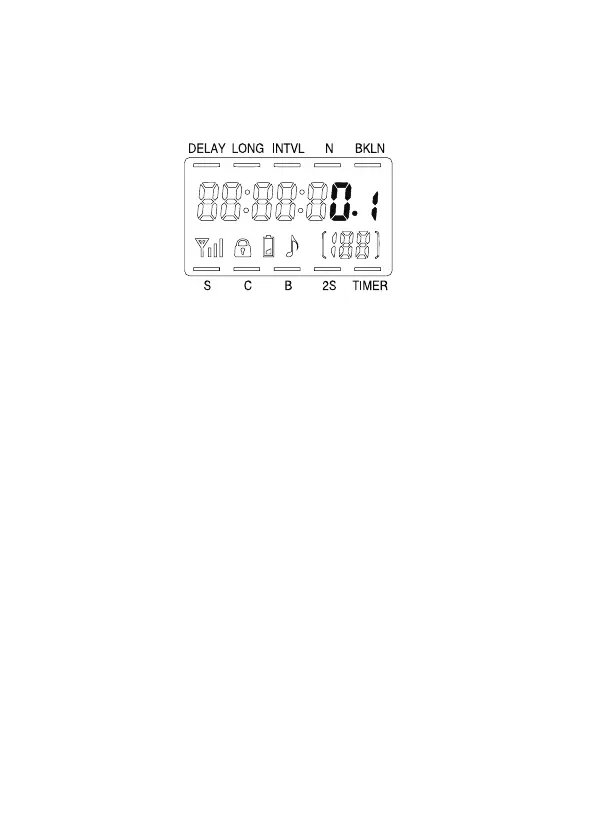
Using the Timer
Aodelan WTR-2 or TRS-1 has two modes:
Shutter release modes
and
Timer mode
.
Note: The Wireless Signal Strength Indicator is not
available on TRS-1’s LCD.
Changing modes on WTR-2(T) or TRS-1
Press the Sound/Mode Button to cycle between modes.
A small indicator line will appear on the LCD over the
selection. The modes are:
S: Shutter Release.
A half-press of the Shutter Button
will focus; a full press will open the shutter. The LED
on the Timer and Receiver will light green when focus
is achieved.
C: Continuous.
A half-press of the Shutter Button will
focus; a full press will open the shutter and take 5
photos.
[ Note ]
The LED on the Timer and Receiver
will light red as the images are recorded. Holding
the Shutter Button will result in more photos being
recorded, in groups of 5.
[ Note ]
Note: Some cameras will only continuously take 3
photos rather than 5, depending on the camera
.
• 10 •
[ Note ]


 To Next Page