Home
AOMAGO
Voice Recorder
L500
Page 8
AOMAGO L500 - Page 8
22 pages
Manual
Save Page as PDF
To Next Page
To Next Page
To Previous Page
To Previous Page
Loading...
①
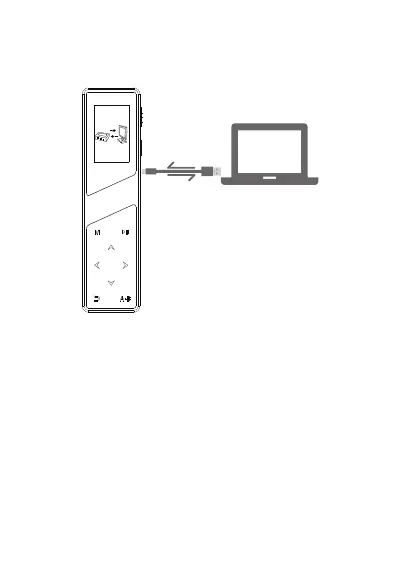
Connect to computer by using the supplied cable.
2
)
T
o transfer files to your computer
.(See Pic)
②
Finding out “Removable Disk”on computer
.
③
Click to enter
, copy your files to your computer,
you can also delete files on computer
.
3
RECORD
USB
7
9
Table of Contents
Main Page
Default Chapter
5
Table of Contents
5
Quick Start Guide
6
Please Do Not Do
7
Basic Operation Guide
7
Recording Settings
13
Record Format
13
Set Rec Bitrate
13
Auto Record
13
AVR Mode
14
Monitor
14
Subsection Record
15
System Setting
15
Display Settings
15
Date and Time
15
Language
16
Password Setting
16
Power off Set
16
Information
17
Disk Space
17
Format Device
17
Factory Settings
17
Play Mode
17
1)Recorder Crash
21
2)Restore Factory Settings
21
3)Format Device
21
4)Forget Password
21
5)Failed to Connect to Your Computer
21
Disk Errors
22
Related product manuals
AOMAGO EBOOK
16 pages


 To Next Page