Need help?
Do you have a question about the AORUS 15 and is the answer not in the manual?
Instructions for turning on the notebook for the first time and notes on audio functionality.
Identifies key hardware components including ports, display, keyboard, and input devices.
Safety guidelines for battery, placement, storage temperature, and ventilation.
Details function keys (Fn+F1-F12) and Fn+Space for system controls like fan speed, sleep, LAN, brightness, display toggle, etc.
Explains how to start the Windows recovery tool to reinstall the operating system to factory default.
Details options like System Restore, System Image Recovery, Startup Repair, Command Prompt, and UEFI Firmware Settings.
Provides information on warranty, service, and links to the GIGABYTE support website for laptops.
Offers links to the GIGABYTE support website for frequently asked questions.
 General
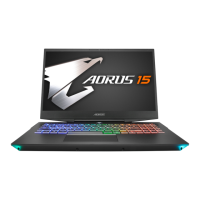
| Battery | 99Wh |
|---|---|
| Display | 15.6-inch |
| Display Resolution | 1920x1080 |
| Display Refresh Rate | 144Hz |
| RAM | 16GB |
| Storage | 1TB |
| Operating System | Windows 11 Home |
| Keyboard | Backlit Keyboard |
| Weight | 2.4 kg (5.29 lbs) |

 To Next Page