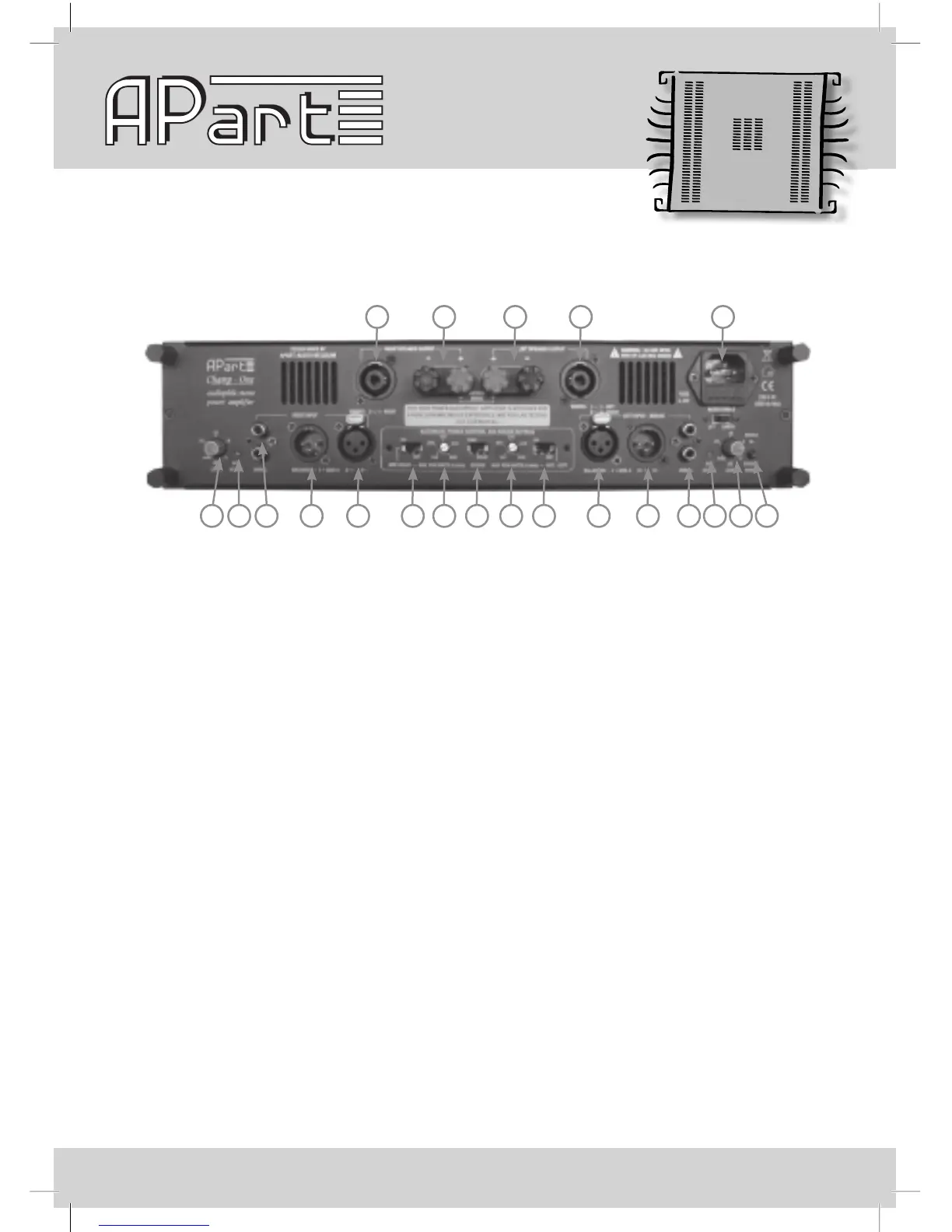
1)RightspeakeroutputongenuineNeutrik®Speakonconnectors.Onlypin1+and1-areused
here.
2)Rightspeakercablebindingposts,thesewillalsoaccept4mmbananaplugson19mm
spacing.
3)Leftspeakercablebindingposts,thesewillalsoaccept4mmbananaplugson19mm
spacing.
4) LeftspeakeroutputongenuineNeutrik®Speakonconnectors.Warning: left channel output
is present on pins 1+ and 1-, right channel output is present on 2+ and 2-.
For bridge mode applications, you MUST use 1+ (bridge mode +) and 2+ (bridge mode -)
OR use the red binding posts.
5)Mainscableconnector:plugthemainscableconnectorhere,thissocketalsocontainsamains
fuseholder.Replacethisfuseonlywitha6.3AT250Vtype.Beneaththefuseholderyoualso
ndthegroundliftswitch.
6)Rightchannelinputlevelcontrol:turnthelevelcontroltoalevelthatguaranteesdistortionfree
music under all circumstances, avoid clipping at the input at all costs !
7)APCactiveledrightchannel,thisisacopyofthefrontpanelAPCled.
8)Rightunbalancedinputoncinchconnectors:usethetoporbottomcinchconnectortoapplyan
unbalancedsignalontherightchannel.Theseconnectorsarewiredinparallel,thismeansyou
can use the second connector as a signal link connector.
9)RightbalancedinputonXLRconnector,thisconnectoriswiredinparalleltoconnector‘10’.
Thisallowsyoutolinkthebalancedsignaltoanotheramplier.
Rearpanellayout:
1 2 3 4 5
6 7 8 9 10 11 12 13 14 15 16 17 18 19 20 21


 To Next Page