30
Close
Tank
Valve
Tilt
System
Check
Valve
1) RO Makes Humming Noise
When RO makes a humming noise, most likely it’s caused by air bubbles being trapped in the
“Check Valve” during installation. See check valve on Fig.16, point E.
To purge air from the check valve, do as follows:
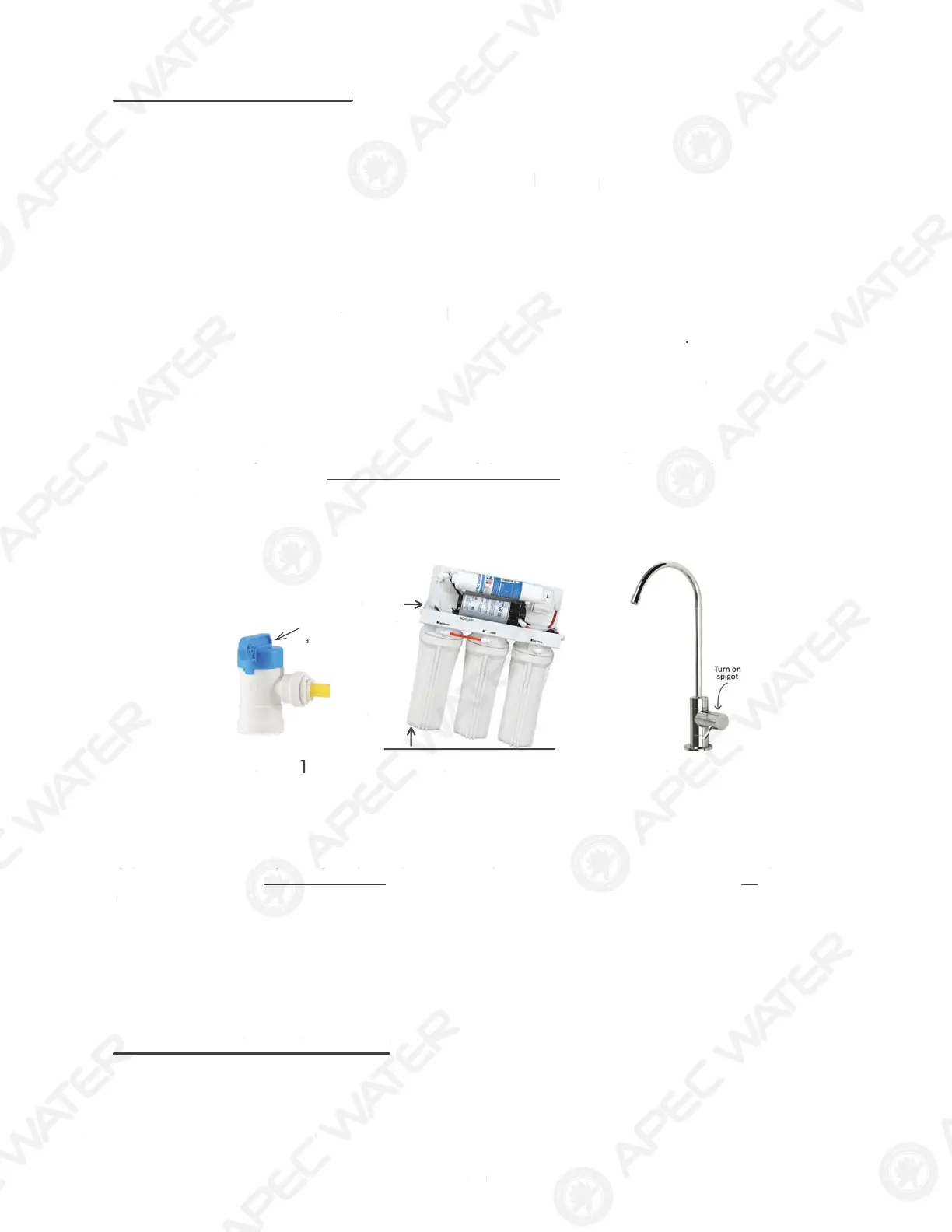
Step 1: Close the tank’s valve.
Step 2: Tilt the RO system to the right. Put something under the 3rd filter housing to keep RO
tilted. This helps dislodge the air bubbles from the Check Valve.
Step 3: Turn on the RO spigot. Let pure water flow through the spigot for about 1 minute.
This forces the air to flow directly out to the spigot, bypassing the tank.
Step 4: Turn off the spigot. Wait for about 10 seconds. Repeat Step 3 again. Do that 3-4
times. If you see air sputtering out of the spigot, repeat Step-3 until pure water can
flow smoothly from the spigot, or until the noise goes away.
Step 5: When the noise is gone, open the tank valve, let RO run as usual.
Fig. 17
Step 2Step 1 Step 3
If the noise comes back, try the above procedure again another 2- 3 times. Sometimes it takes
several tries to get rid of all the air in the system.
If the noise persists after a few days, that means there is air in your water source, or the current
Check Valve is resonating with your water pressure and pipes, creating the noise.
In this case, a new Check Valve will solve the problem. Contact APEC customer service for
assistance.
2) No Water at Dispensing Faucet
- Water supply is off —> Turn on water, or open Needle Valve (turn needle handle counterclockwise)
- Tank’s valve is closed —> Turn tank valve to an “Open” position
n
i
yst
Chec
lve
When RO makes a humming noise, most likely it’s caused by air bubbles being trapped in the
Check Valve” during installation. See check valve on Fig.1
, po
nt E.
To purge air
rom the check valve, do as
ollows
Step 1: Close the tank’s valve.
Step 2: Tilt the RO system to the right.
ut something under the 3rd
ilter housing to keep RO
tilted. This helps dislodge the air bubbles
rom the Check Valve
Step 3: Turn
the RO spigot. Let pure water
low through the spigot
o
t 1 min
t
.
This
orces the air to
low directly out to the spigot, bypassing the tank.
Step 4: Turn
the spigot. Wait
or about 10 seconds. Repeat
tep 3 again. Do that 3-4
times. If you see air sputtering out of the spigot, repeat Step-3 until pure water can
low smoothly
rom the spigot, or until the noise goes away.
Step 5: When the noise is gone, open the tank valve, let RO run as usual.
F
g. 17
tep
tep
tep 3
the noise comes back, try the above procedure again another 2- 3 times. Sometimes it takes
everal tries to get rid o
all the air in the system.
If the noise persists after a few days, that means there is air in your water source, or the current
Check Valve is resonating with your water pressure and pipes, creating the noise.
n this case, a new Check Valve will solve the problem. Contact APEC customer service
o
assistance
2
No Water at Dispensing Faucet
Water supply is o
—
Turn on water, or open Needle Valve (turn needle handle counterclockwise
Tank’s valve is closed
Turn tank valve to an “O
n”
osition



 To Next Page