C. Loop Recording
Where there is insufficient space on the memory card, the "loop
recording" function automatically overwrites the oldest file on the memory
card, replacing it with a new recording.
D. Emergency Recording
· Automatically: In the event of a sudden collision or sudden
acceleration,sudden swerve and so on, the Gravity sensor will
be triggered. The video will be recorded and locked for a
certain period of time before and after the event. These
important videos are not automaticaly overwritten, but are
saved in the Event folder of the Emergency Recording storage
space.
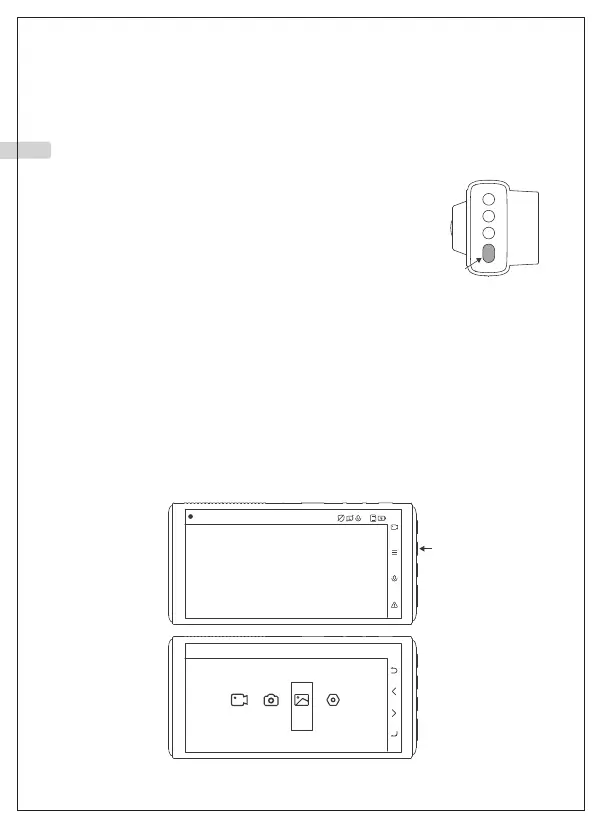
· Manully: If you want to take and save a fascinating view or an urgent
event while driving, you can press the orange button to make an
emergency recording.
A. Playback on camera
Stop recording first and press the second button to enter the menu. You
can find your recordings in the Files folder.
Video Playback and Deletion
2021/01/01 01:54:35
00:00:06
Video
Mode selection
Photo
Files
Settings
01 02 03 04 05 06 07 08 09 10 11 12 13 14 15
16 17 18 19 20 21 22 23 24 25 26 27 28 29 30
31 32 33 34 35 36 37 38 39 40 41 42 43 44 45
EN



 To Next Page