3 Instrument Description
3.1 LCD Display
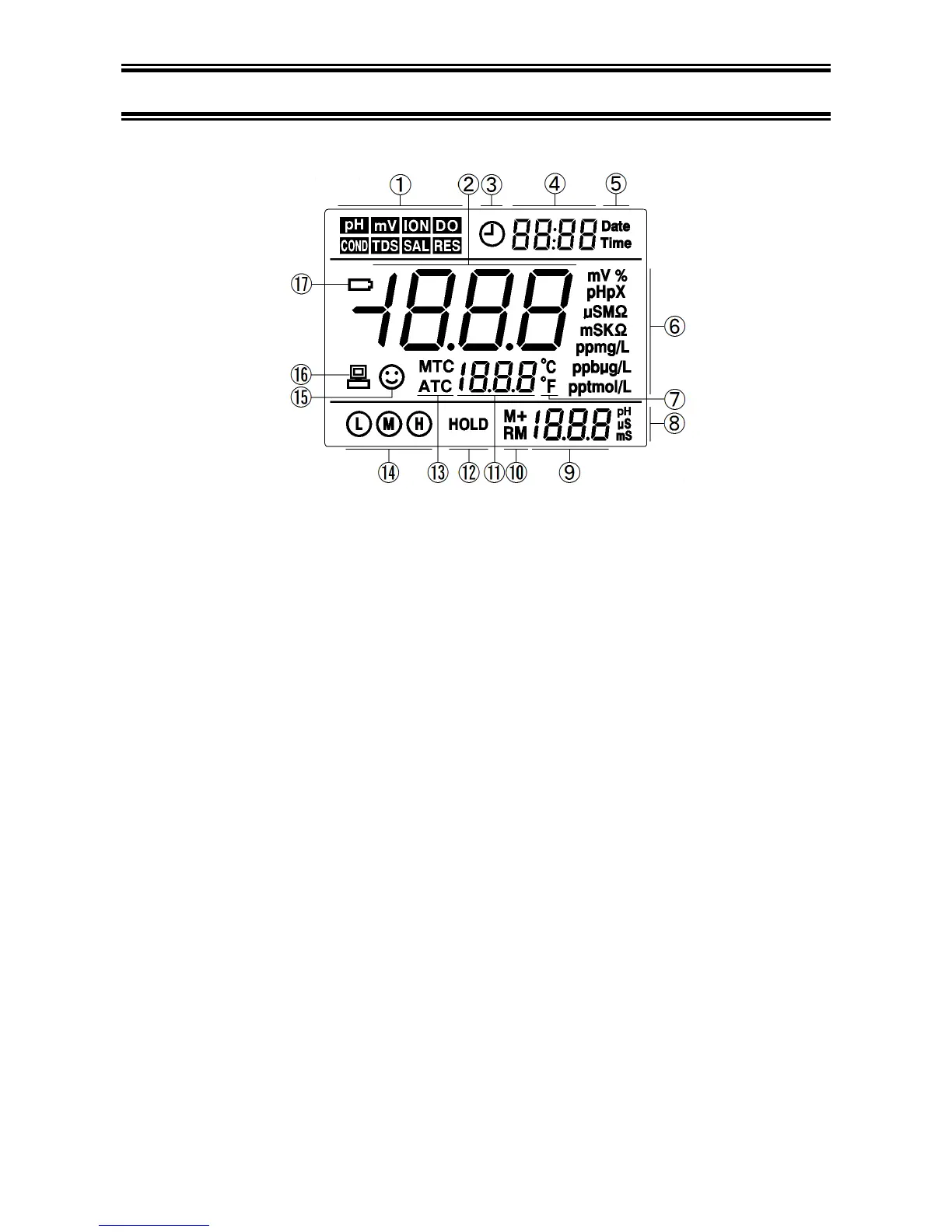
(1) — Measurement mode icons
(2) — Measurement value
(3) — Timing storage icon. When this icon appears, the meter is in the automatic storage mode
(4) — Date and time display value, and prompts of special display mode
(5) — Units of Date and time
(6) — Units of measurement
(7) — Temperature units (°C and °F)
(8) — Units of pH and conductivity calibration value
(9) — pH and conductivity calibration value, the numbering for storage and recall, and prompts of
special display mode
(10) — Storage and recall icons
M+ — Measurement to be stored icon, RM — Reading to be recalled icon
(11) — Temperature value and prompts of special display mode
(12) — Automatic reading lock-up icon
(13) — Temperature compensation icons
ATC — automatic temperature compensation, MTC — manual temperature compensation
(14) — Calibration guide icon
(15) — Stability icon of readings
(16) — USB icon,when this icon appears, the meter connects the computer
(17) — Low battery icon, when this icon appears, please renew the battery


 To Next Page