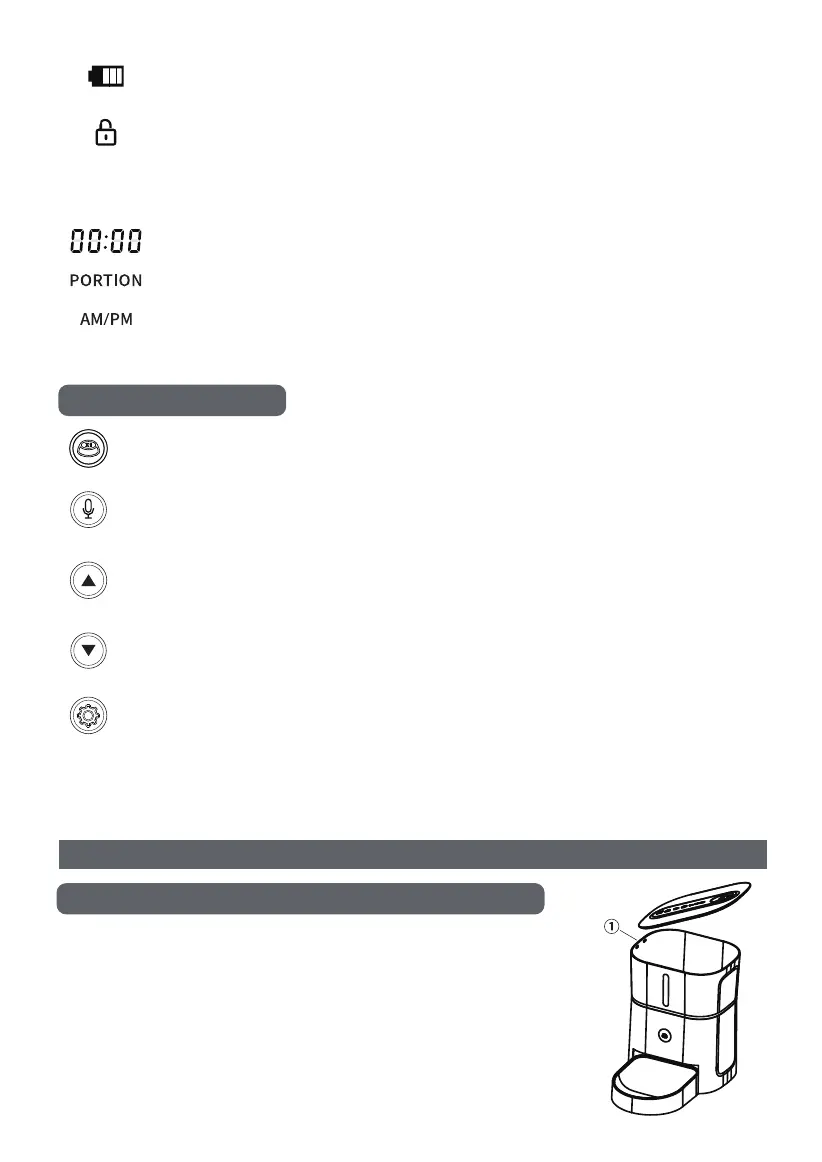
◎Press the button on the top of the product to unlock the cover
and remove it.
◎The inner side of the cover has a built-in desiccant box. Gently
press the latch (refer to the diagram) to open the desiccant box.
◎When installing the cover, align it with position 1 first, then press
it lightly until you hear a click sound to lock it.
03
Detaching and assembling the food cover
Button description
Cannot operate when locked, long press the down key for 6 seconds
until hearing a “beep" to unlock the screen.
Display the number of meals for the day, up/down keys to switch between
selected meal numbers (up to 6 meals can be set).
Display current time.
Display the portion of current feeding.
Display time in 12-hour format.
Note: The screen will automatically lock after 30 seconds of standby.
Instructions For Use
123456M
Feed button: Press to manually feed once.
Record button: Long press for 3 seconds to hear a “beep" sound to start recording.
Release to hear a prompt tone to stop recording.
Up/Reset button: Set the clock and feeding time; also serves as a factory reset button.
When locked, press and hold for 6 seconds until you hear a "beep beep" sound to reset
to factory settings and clear all recording records, feeding plans, and meal numbers.
Down/Unlock button: Set the clock and feeding time; also serves as an unlock button.
When the screen is locked, press and hold for 6 seconds to unlock the screen.
Setting button: Short press to enter the feeding setting interface. Press again to switch
between meal numbers → feeding time → feeding portions.
Long press the setting button to set the standard time for the feeder, which can be
synchronized with local time.
Display battery level: Show full battery when connected to power,
actual battery level when using battery power.


 To Next Page