7. Complete the installation:
8. Parts placement:
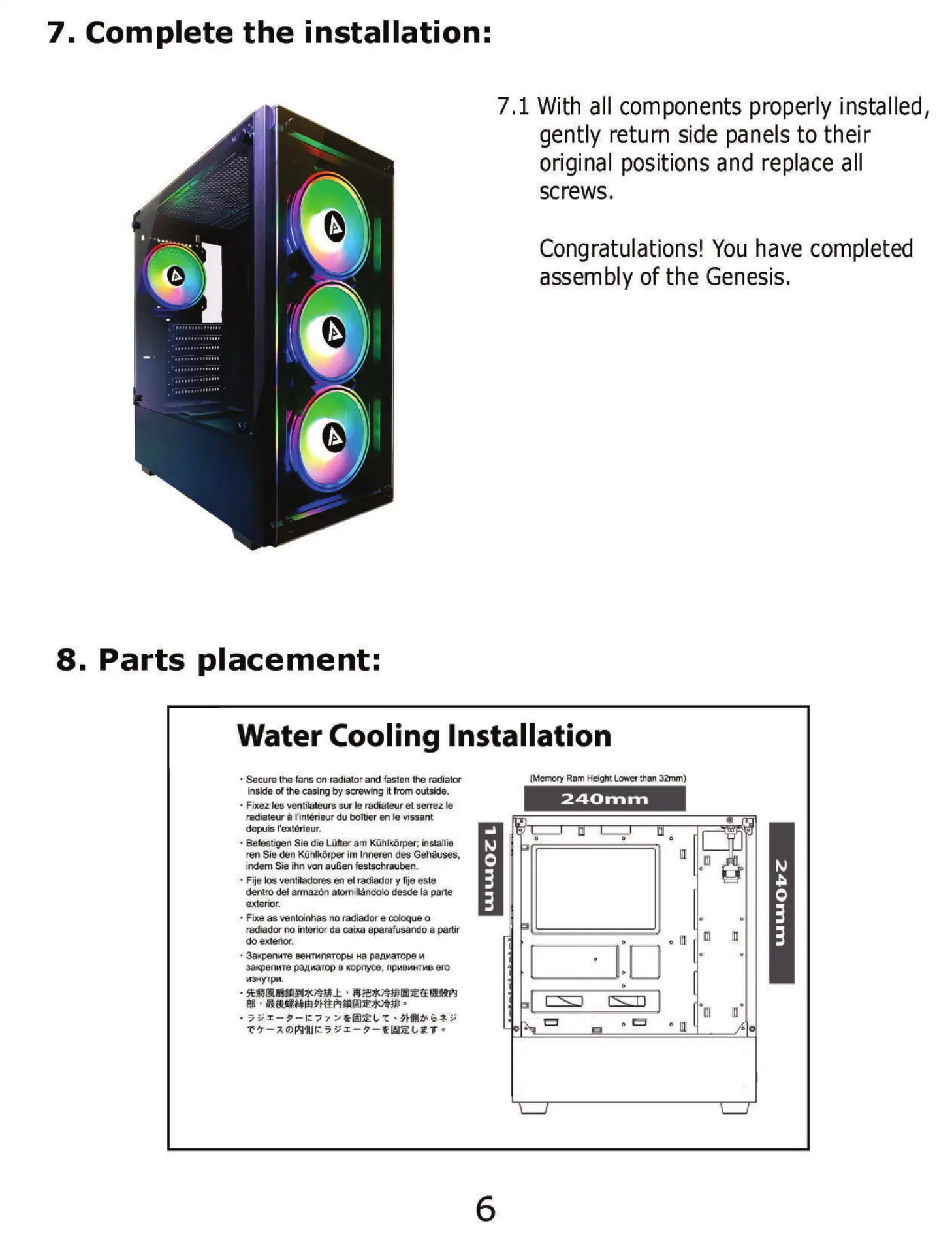
7.1 With all components properly installed,
gently return side panels to their
original positions and replace all
screws.
Congratulations! You have completed
assembly of the Genesis.
Water Cooling Installation
• Secure the fans on radiator and fasten fre radiator
inside of the casing by screwing it from outside.
• Fixez Ies ventilateurs sur Ie radiateur et serrez Ie
radiateur Cintérieur du boltjer en Ie vissant
&puis I'extérieur.
• Befest19enSie die Lüfter am Kühlkörper; installie
ren Sie den Kühlkörper im Inneren des Gehäuses,
indem Sie ihn von außen festschrauben
• Fije IOSventiladores en eI radiador y fije este
dentro del armazön atomillåndolo desde Ia parte
exterior.
• Fixe as ventoinhas no radiador e cdoque o
radiador no interior da cua aparafusando a partir
exterior.
• 3axpenure gewgnRTOPbIHa paamarope
aaxpenwe pannarop B xopnyce, nPMB*HTMB ero
(Mnory Ram Lcwer than 32nyn)
240 E" rn


 To Next Page