4. Install hard drives:
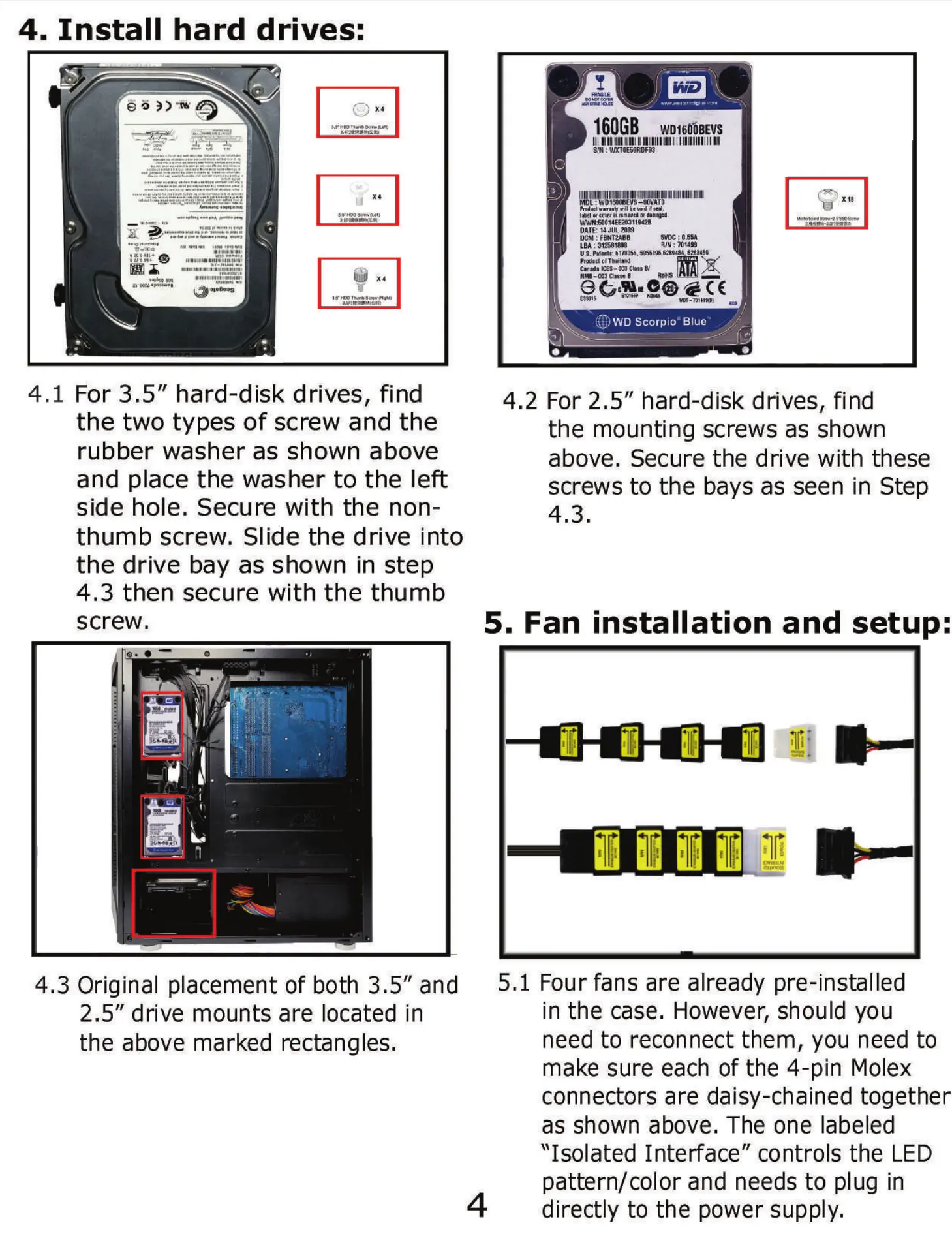
4.1 For 3.5" hard-disk drives, find
the two types of screw and the
rubber washer as shown above
and place the washer to the left
side hole. Secure with the non-
thumb screw. Slide the drive into
the drive bay as shown in step
4.3 then secure with the thumb
screw.
4.3 Original placement of both 3.5" and
2.5" drive mounts are located in
the above marked rectangles.
4.
160GB WD160iBEVS
(o
Vill i! ,
renutd or
DATE: U JUL 2009
OCM : FBNTUBB
RIN : 7014*
LBA : 31681"
U.s. ezgasg
Prod•ct ot
CES-ü
(O)WDScorpio'Blue•
2 For 2.5" hard-disk drives, find
the mounting screws as shown
above. Secure the drive with these
screws to the bays as seen in Step
4.3.
5. Fan installation and setup:
5.1 Four fans are already pre-installed
4
in the case. However, should you
need to reconnect them, you need to
make sure each of the 4-pin Molex
connectors are daisy-chained together
as shown above. The one labeled
"Isolated Interface" controls the LED
pattern/color and needs to plug in
directly to the power supply.


 To Next Page