EasyManua.ls Logo

Apex Digital MACH 1 - Display and Interface; Current Selector; Delay Button; RFID Panel

Apex Digital MACH 1
10 pages
To Next Page IconTo Next Page
To Previous Page IconTo Previous Page
Loading...
www.ApexCharger.com
Quick User Guide
MACH 1
MACH 1
Display and interface
Plug N’ Play
For the true Plug N’ Play experience, swipe the RFID card on the RFID
panel then hold the Delay button for 5 seconds. This will activate Plug
N Play mode; Plug your EV in and it starts charging automatically!
If you wish to deactivate the Plug N’ play feature,
follow the same steps.
Current selector
Button to
adjust the
current to be
used on the
charging session.
Delay button
Use this button
to adjust the
delay until the
next charging
section starts.
RFID panel
RFID reader for
charger control.
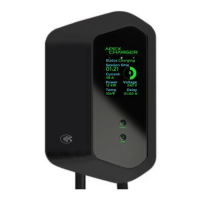
MACH 1 display
Shows the current
charging session’s
real-time stats, as
well as additional
Information through
the icons on the top:
- Grounding status.
- Delay status.
- Connectivity status.
104 F 01:00 H
12 kW 240 V
VoltagePower
48 A
Current
Temp Delay
01:21
Session time
Status Charging