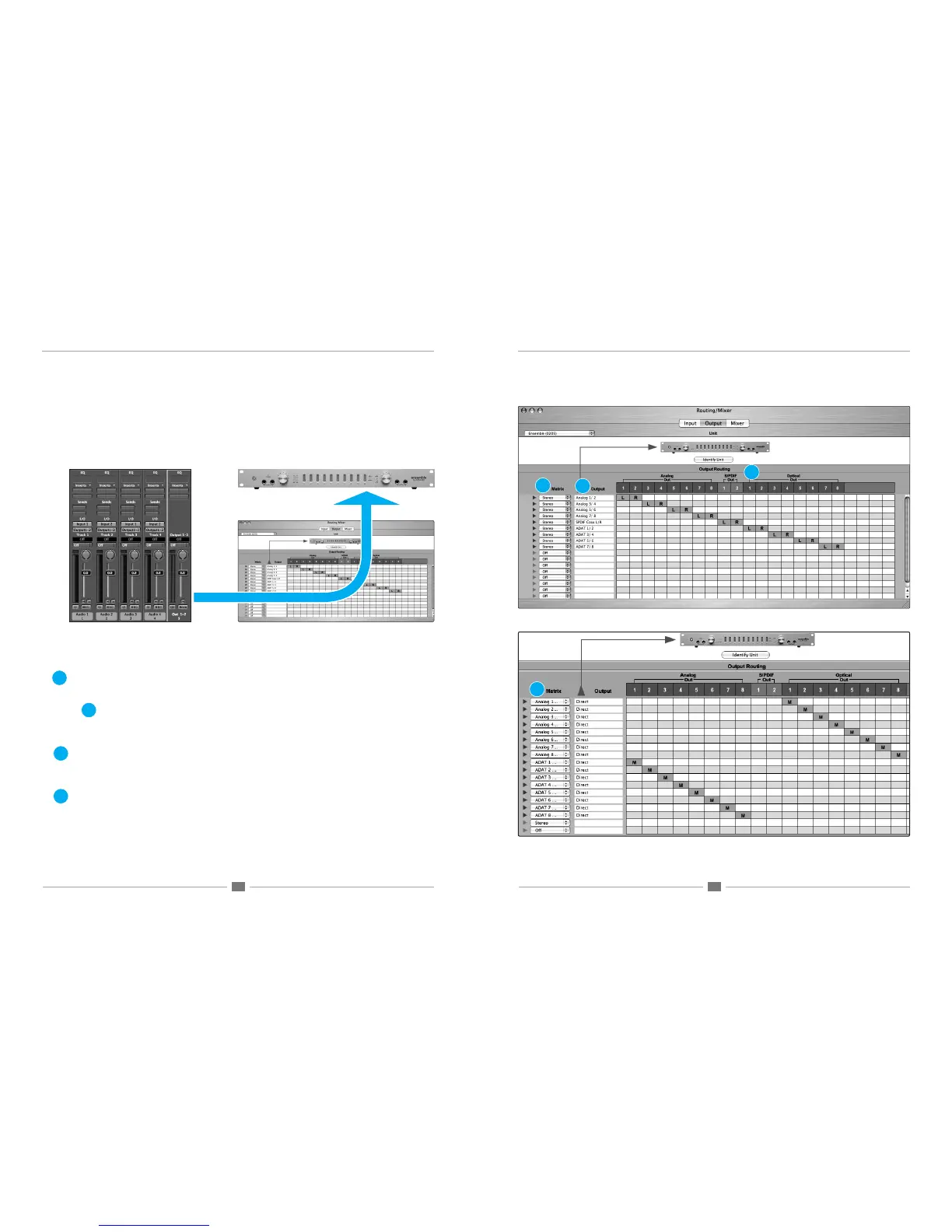
Output Pane
The Output routing pane is functionally similar to the Input pane, but used to make connections between software and
hardware outputs, as depicted below. Software outputs are displayed to the left of the grid, and hardware outputs are
displayed across the top of the grid.
1.Matrix – The settings in these drop down menus dene how software outputs are formatted in the routing grid:
Mono - software outputs are formatted as Mono signal paths.
Stereo - software outputs are formatted as Stereo signal paths.
Off - the signal path is deactivated.
(hardware input) Direct - this setting, unique to the Output pane, provides a signal path to route hardware
inputs directly to hardware outputs. For example, it’s possible to route Ensemble’s 8 analog inputs to the optical
output while routing the optical input to the 8 analog outputs. This conguration is shown in the lower routing page
example shown at right.
2. Output – This column displays the software outputs available for routing. Software output names may be modied
by clicking on the triangle to the left of the Matrix to reveal a text entry box. For these names to appear in your audio
application’s I/O list, it’s necessary to specify this in the audio app. For example in Logic Pro, open Audio>Audio
Conguration>View>I/O Labels and Option-click on all the I/O found under the Driver’s I/O Label column.
3. (Analog,Hardware) Out - This row displays the hardware outputs available for routing.
Maestro Mixer Window Output Pane
1
2
1
2
3
Output Signal path: Logic> Maestro> Ensemble
3
1a
1a



 To Next Page