7
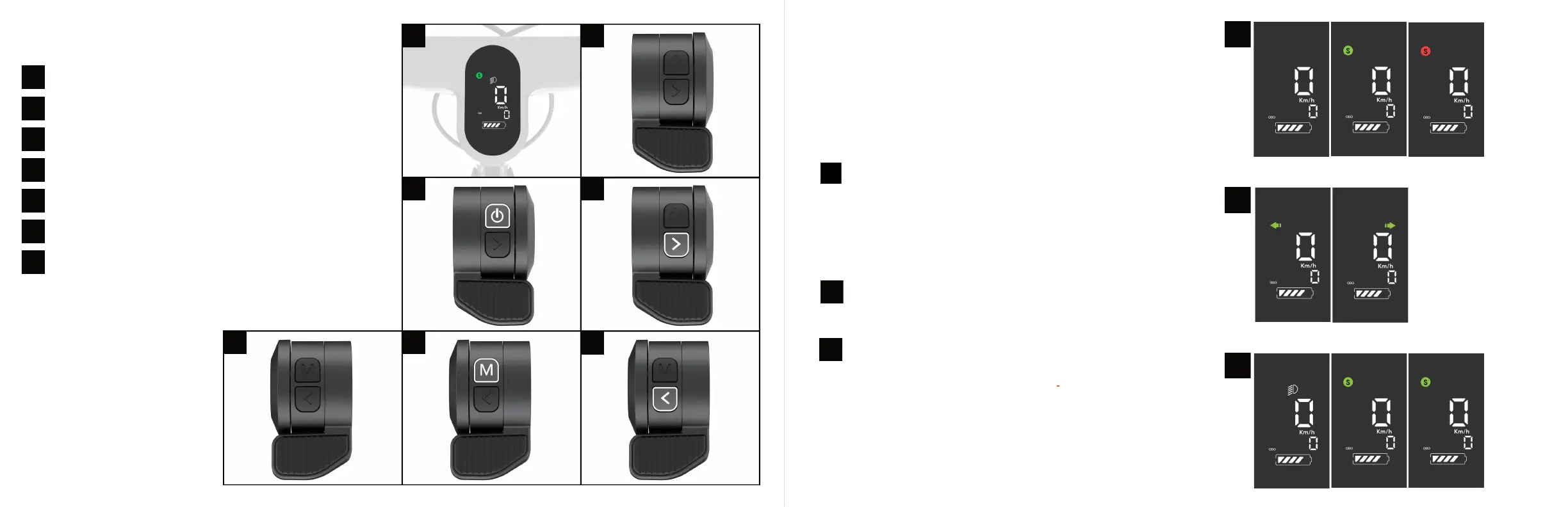
Handlebar features
Display
Accelerator throttle (right-hand side of the handlebar)
Accelerator throttle- Power button-Gear change
Accelerator throttle- right turning signal
E-brake throttle (left side of the handlebar)
E-brake throttle- Mode button-light ON-Off
E-brake throttle- left turning signal
2
3
4
5
6
7
1
5
3
6
1 2
4
7
14 15
The display screen, located on the han- dlebar,
shows you the speed, the battery charge,
whether the front and rear lights are on, and any
failure displays.
The scooter is controlled by three buttons:1
2
3
2
3
1
DISPLAY
TURN SIGNALS
ON/OFF BUTTON
MODE BUTTON (M)
Short click — turn on/off light
2 Short clicks — Switch from Trip Mileage to ODO
While riding you may notice an occasional beeping
noise, indicating you are riding above the speed of
the selected gear.
Left arrow short click — Left turning signal
Right arrow short click — Right turning signal
One click — Eco mode
Two clicks — Comfort mode - after a second click you
should see a Green "S" on the display
Three clicks — Sport mode - another short click
should display a Red "S". You can change the gears
and speed limit of your scooter via the Apollo App.


 To Next Page