3
10 11
OPERATION
Charging
This section focuses on how to charge your
scooter correctly. For information about
battery health and best practices, please
review the Battery Information section.
The battery pack comes with a built-in
battery management system. This includes
overcharging protection amongst other
features, allowing your scooter to stay
plugged in even after it is fully charged.
Please note that this applies to short peri-
ods of overcharging, such as the scooter
being plugged in overnight. Please do not
leave the scooter plugged in and charging
for extended periods of time as it may result
in battery damage or fire.
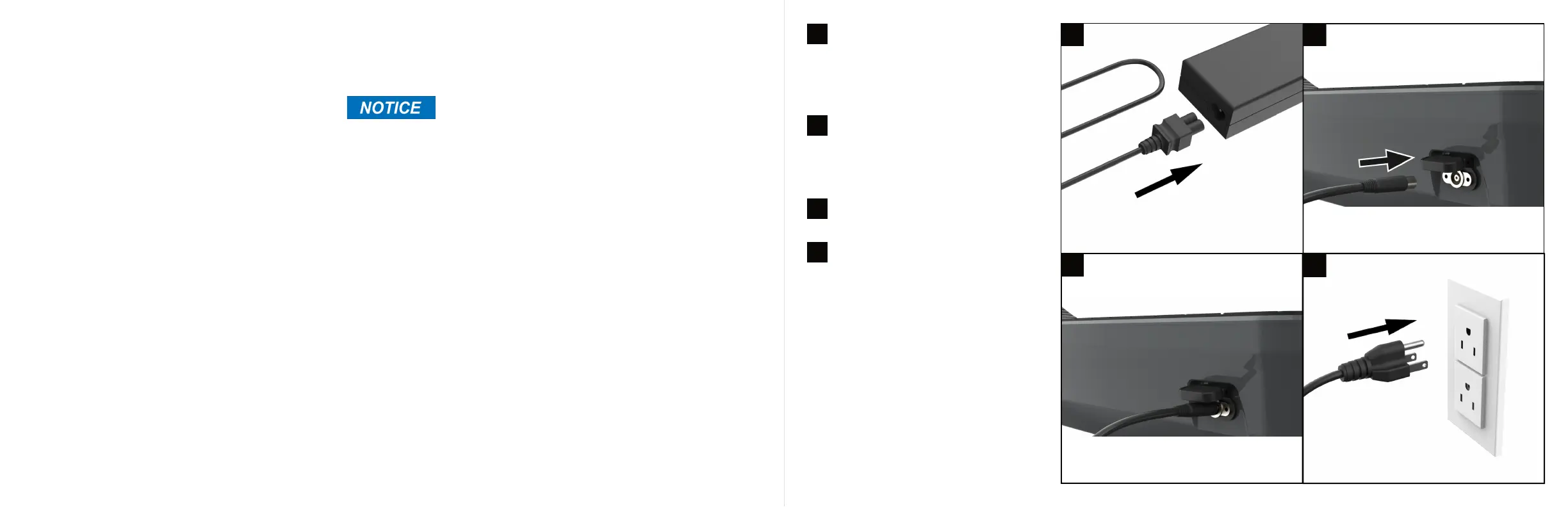
Gently insert the cable.
First, ensure the two parts of the charger
are connected securely. The wall AC plug
should be connected to the charger box.
The connection between the cable and
box should feel firm with no wobble or
play.
Next, locate the charging port cap on
your scooter and open it to find the
charging port. Locate the round connec-
tor on one end of the charger, this is the
end you must insert in the charging port.
Proceed to plug the AC plug on the other
end of the charger into a 120 volt power
outlet. If the battery is 100% full, the
charger light will turn green. If the battery
is not fully charged, the charger light will
light up red.
2
3
4
1
1 2
4
You will need to turn off the scooter before
charging.


 To Next Page