Apollo Twin Hardware Manual Chapter 3: Controls & Connectors 20
Chapter 3: Controls & Connectors
Complete details about the Apollo Twin hardware controls and all connector jacks on the
front and rear panels are provided in this chapter.
Note: For instructions on how to set input gain levels and monitor/headphone vol-
umes, see “Setting Hardware I/O Levels” on page 26.
Top Panel
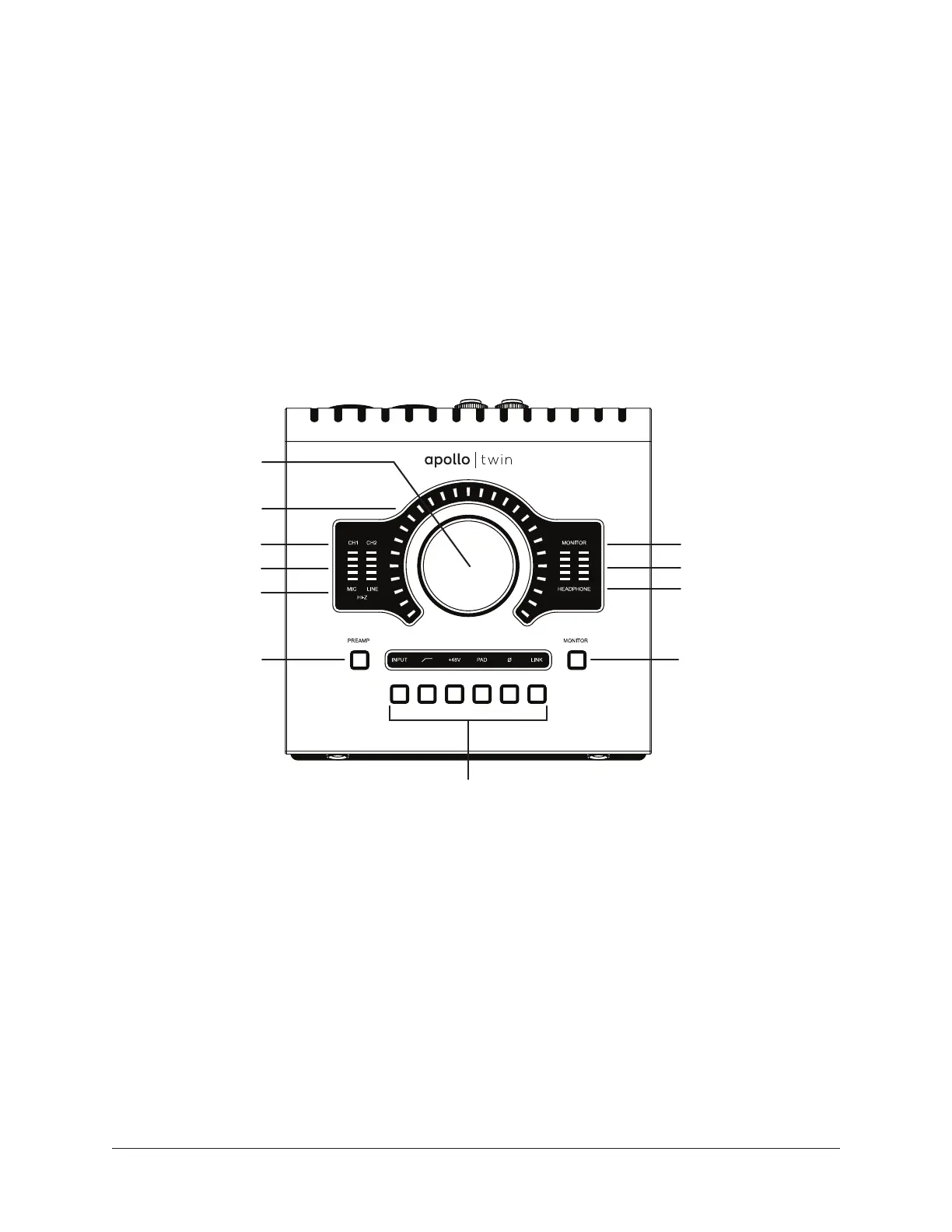
Refer to the illustration below for control descriptions in this section.
Apollo Twin’s top panel elements
(1) Level Knob & Switch
The Level knob & switch controls multiple functions. The knob’s current function is se-
lected with the Preamp (9) and Monitor (10) buttons.
Rotate clockwise to increase level of the selected function. When Monitor is selected (6),
press to mute/unmute the monitor outputs. When Preamp is selected (3), press to alter-
nate between channels 1 & 2.
Tip: The Level knob is also used to control gain staging when Unison is active with
certain UAD preamp plug-ins. See the Apollo Software Manual for details.
1
2
9
10
11
3
4
5
6
7
8


 To Next Page