5
Operation – Apple Devices
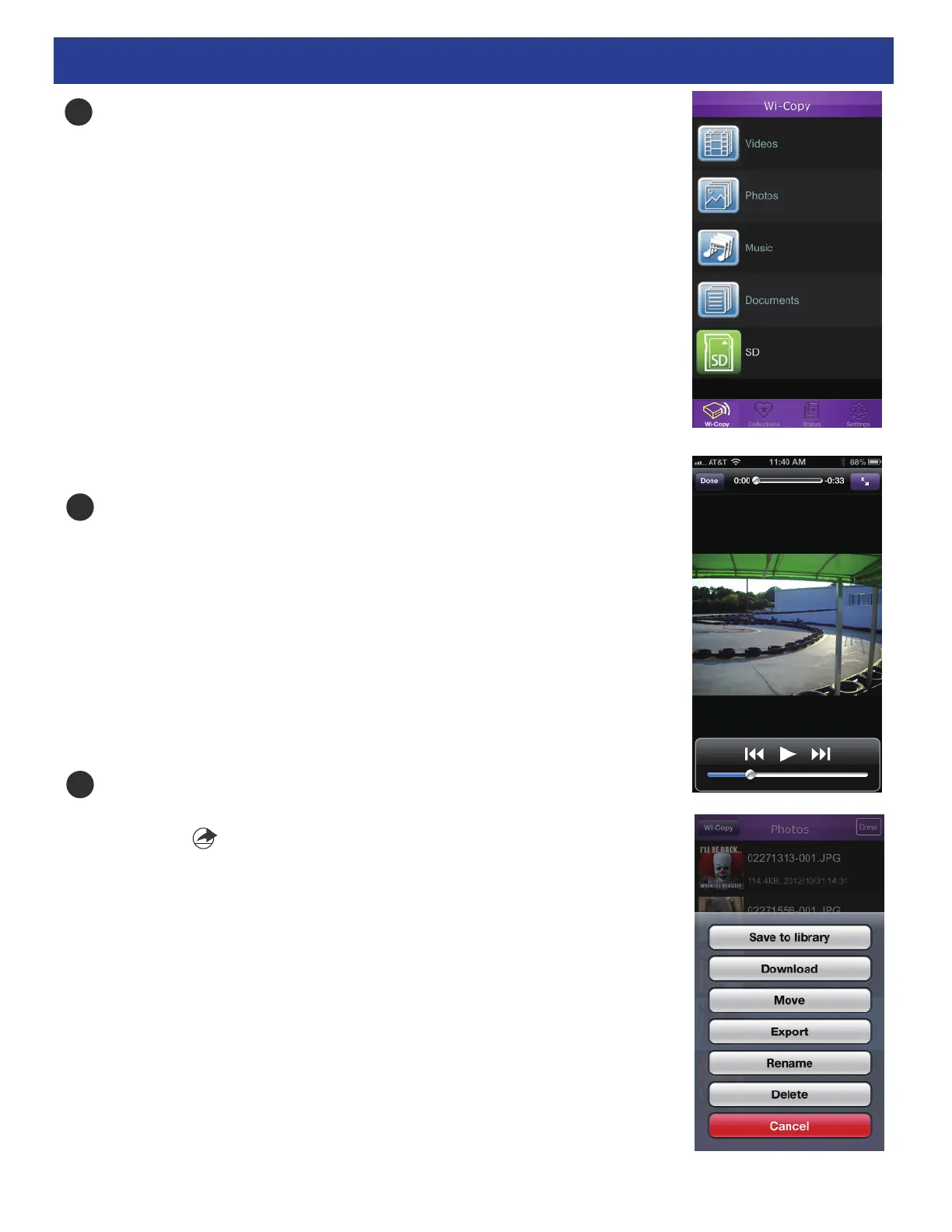
Tap the Wi-Copy App to open the App. You will see five items:
Select the SD Card or Flash Drive to view the contents or select
one of the categories and the valid files will appear. See below
for valid file formats.
Video: M4V, MP4, MOV
Photos: JPG, BMP, PNG
Music: MP3, WAV, AAC
Documents: PDF, DOC, PPT, TXT, HTM, XLS, .KEY, .PAGES, .NUMBER
Tap one of the files and it will play/appear right in the
Wi-Copy App!
If you try to play a non-valid file, “Unable to Open” will
appear on the screen.
Miscellaneous Editing Options: While a list (music, photo, SD
Card, etc.) appears, tap Edit, tap on the desired file(s) and then
click the icon. This will bring up buttons which perform the
following functions:
Save to Library (Photos only): Tap to save the photo to your
device photo library.
Download: Tap to download the file into your Collections.
Move: Tap to move the file into another folder.
Export: Tap to export the file into other APP like Dropbox.
Rename: Tap to rename the file.
Delete: Tap to delete the file.
Cancel: Tap to cancel.
4
5
6


 To Next Page