EasyManua.ls Logo

Apple 2009 iMac - Page 215

Apple 2009 iMac
227 pages
Print Icon
To Next Page IconTo Next Page
To Previous Page IconTo Previous Page
Loading...
iMac (21.5-inch, Late 2009) Take Apart — Rear Housing 215
2010-11-18
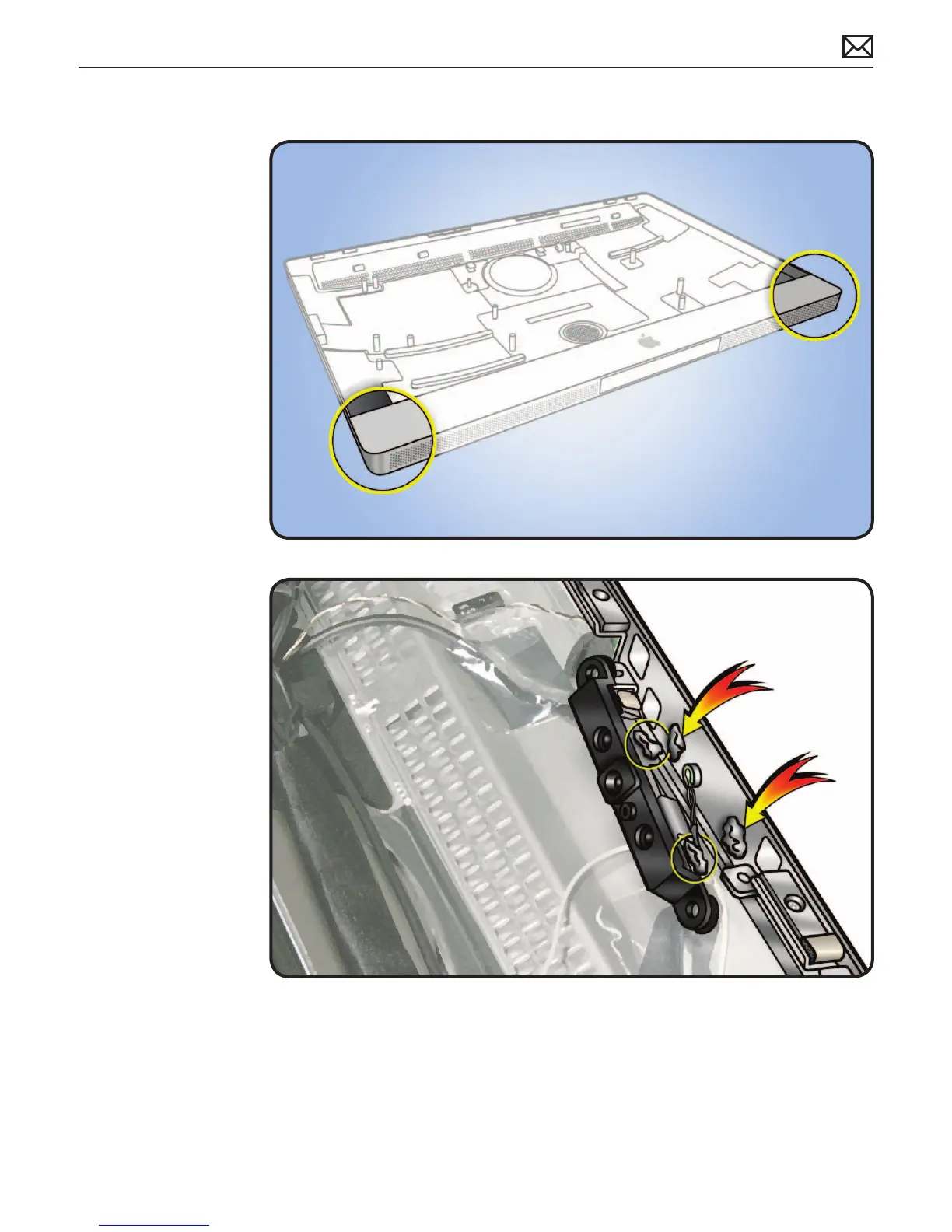
Handling Rear
Housing
Important: Handling rear
housing part incorrectly
could ex aluminum and
cause alignment issues.
Always handle rear
housing with 2 hands in
the lower left and right
corners.
Never carry rear housing
with a single hand, or by
holding the aluminum
chin (where Apple logo
appears on front).
Camera Thermal
Paste
Transfer camera from
old rear housing to new
rear housing and reuse
thermal paste from old
rear housing.
Use a black stick to
remove and reapply
thermal paste to camera
(areas circled).
Note: A syringe of
thermal paste is available
as needed, Apple part#
922- 9625, good for 5
applications.
Important: This white
thermal paste should NOT
be used for any other
purpose (such as portable
computer heatsinks).

Related product manuals