iMac (21.5-inch, Late 2009) Symptom Charts — Startup and Power 29
2010-11-18
Symptom Charts
Follow steps in the order indicated below. If an action resolves the issue, retest system to verify.
Note: A compilation of Quick Check tables is available at:
http://service.info.apple.com/QRS/en/quickreference.pdf
Startup and Power
No Power, Dead Unit
Unlikely cause: speakers
Quick Check
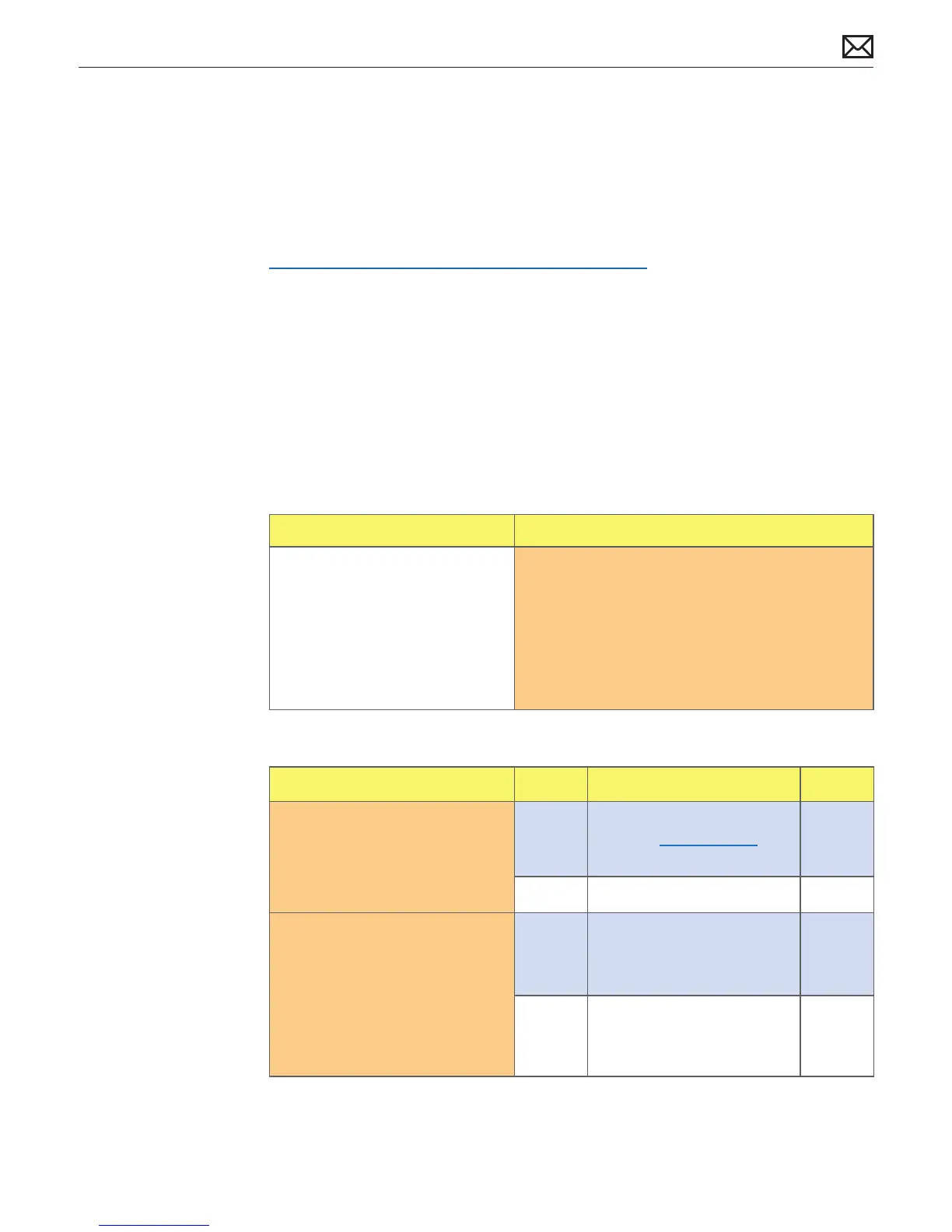
Symptoms Quick Check
No Power, Dead Unit
• No power
• No fan spin
• No startup chime
• No image on external display
• No hard drive or optical drive
activity
1. Verify power source.
2. Verify power cable.
3. Listen closely for signs of activity from system
including: rotating fans, hard drive or optical drive
activity, startup chime, etc.
Deep Dive
Check Result Action Code
1. Power ON system. Verify if
there is any indication that the
system has powered up (fan
rotation, hard drive or optical
drive noise, backlight turns on).
Yes
The symptom is powering
up. Go to Won’t Start Up
symptom ow.
No Go to step 2.
2. Locate diagnostic LEDs in
bottom case vents. Plug AC
cord into system. Verify if
diagnostic LED #1 turns ON.
You may alternately check for
presence of a 12V DC signal
between pin 4 and pin 1 of
logic board.
Yes Standby power voltage being
supplied by power supply.
Go to step 3.
No Replace power supply.



 To Next Page