iMac (21.5-inch, Late 2009) Symptom Charts — Mechanical 96
2010-11-18
Deep Dive
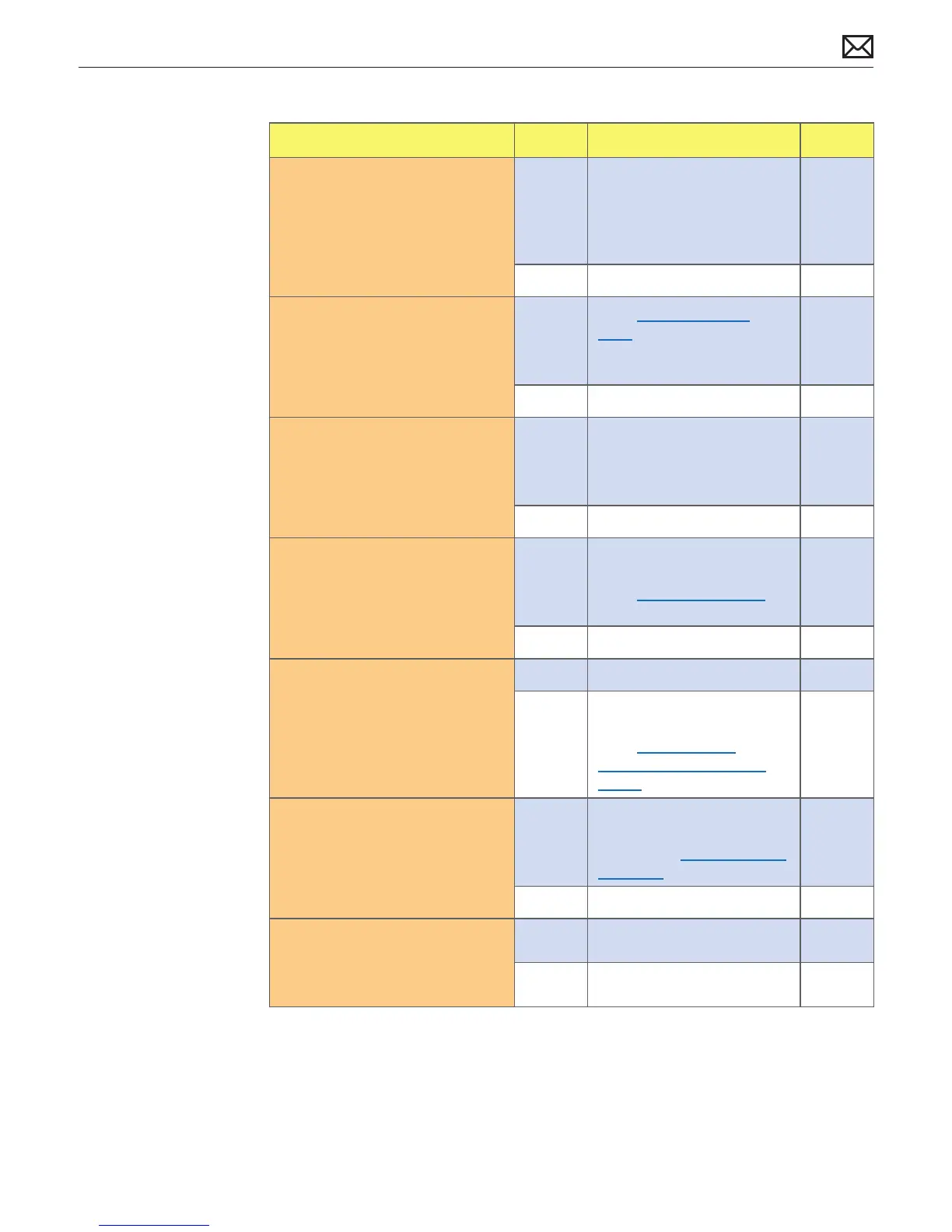
Check Result Action Code
1. Verify if any tape, gasket, cable
label, or cable is touching
the fan blades and causing a
ticking noise.
Yes Secure the material so it
doesn’t touch fan blades. If
tape adhesive has lost its
stickiness, replace that section
of tape.
No Go to step 2.
2. Run Apple System Diagnostic.
Verify if running ASD generates
one or more errors.
Yes
Go to ASD Error Codes
table to decode error. Follow
instructions in table for
resolving error, then retest.
No Go to step 3.
3. Verify if noise sounds like one
or more fans are spinning faster
than expected.
Yes Reset SMC by disconnecting
power cord for ~15 seconds
then retest. If issue continues
go to step 3.
No Go to step 6.
4. Verify if noise changes when
optical drive is being accessed
or media is inserted or ejected.
Yes Suspect issue with optical
drive or media used.
Go to Optical Drive Noisy
symptom ow.
No Go to step 5.
5. Mute the system volume. Verify
if issue still occurs.
Yes Go to step 6.
No Suspect issue with speakers
or audio amplier circuitry.
Go to Audio: Built-in
Speakers Have Distorted
Sound symptom ow.
6. Adjust brightness on display
between maximum and
minimum settings. Verify if
issue changes depending on
brightness level.
Yes Suspect issue with LCD
display or backlight controller
board. Go to Noise/Unstable
Flickering symptom ow.
No Go to step 7.
7. Remove fans and rotate
blades. Verify if fan blades spin
smoothly without interference
from fan housing.
Yes Go to step 8.
No Replace aected fan. P04



 To Next Page