iMac (24-inch) Take Apart — General Information 8
How to identify your iMac
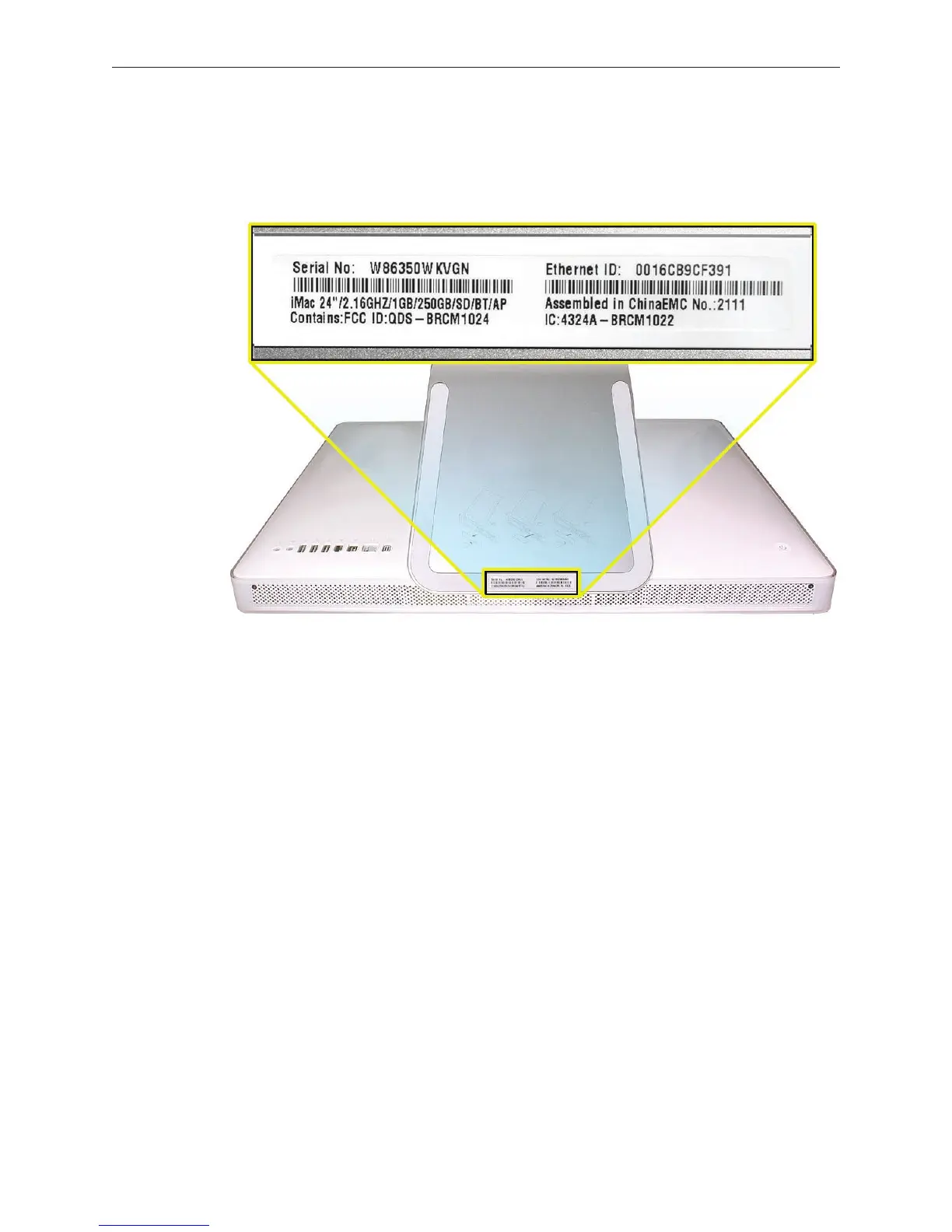
On the bottom of your iMac stand, you’ll nd a label with the serial number printed on it:
This label also provides the computer conguration and an “EMC” number (EMC No.). The EMC
number for the iMac (24-inch) computer is 2111. The EMC number is unique for dierent iMac
models.
To conrm the conguration from the Apple menu, choose About This Mac. The Processor listing
will show the speed of the processor followed by the processor type.
The iMac (24-inch) has several features that distinguish it from earlier iMac models:
2.16 GHz or 2.33 GHz Intel Core 2 Duo processor
Mobile Express Module (MXM) type II video card: NVIDIA GeForce 7300 GT, 128 MB or
NVIDIA GeForce 7600 GT, 256 MB
24-inch TFT 8:5 aspect ratio at panel display (1920x1200 native resolution)
250 or 500 GB hard disk with serial ATA 150 MB/s interface
Up to 3.0 GB system memory
Note About Images in This Manual
Because a pre-production model was used for most of the images shown in this manual, you may
notice small dierences in appearance between the image pictured and the computer you are
servicing. However, the steps and sequence are the same unless noted.
•
•
•
•
•



 To Next Page