EasyManua.ls Logo

Apple Macintosh - Page 250

Apple Macintosh
321 pages
Print Icon
To Next Page IconTo Next Page
To Previous Page IconTo Previous Page
Loading...
More
on
MacPaint 253
Th
e s
tair
railin
g is c
reate
d
usm
g
th
e line with
th
e third
thic
kn
ess.
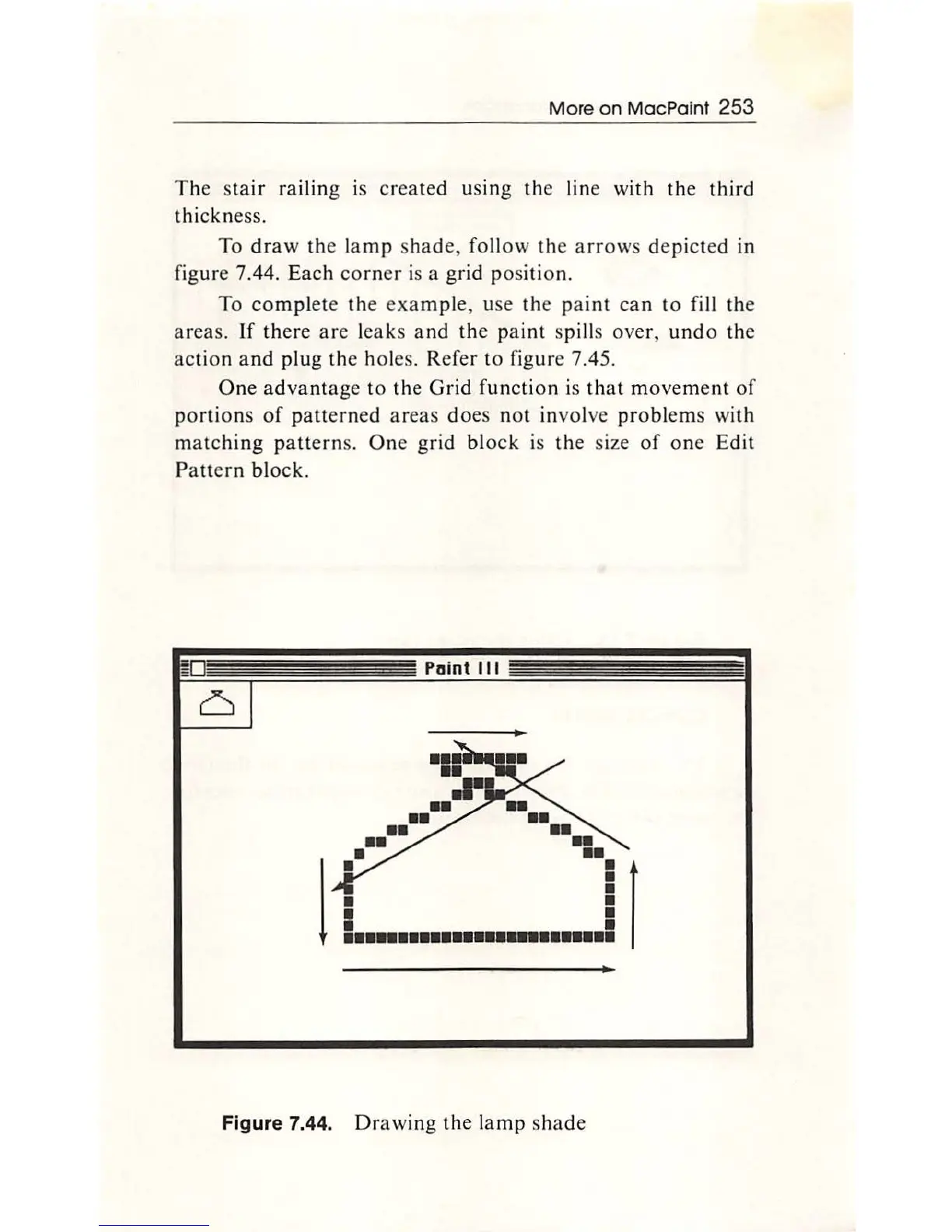
To
dra
w
th
e la
mp
shade, fo
ll
ow
the
arro
ws depicted in
fi
g
ur
e 7.44.
Each
co
rner is a grid p
os
ition.
To
co
mpl
ete
th
e
exa
mpl
e, use the pai
nt
can
to
fill the
areas.
If
ther
e
ar
e l
eaks
and
th
e pa int spills over,
und
o
th
e
ac
t
io
n
and
plu
g the holes. Refer
to
fi
g
ur
e 7.4
5.
One
advant
age
to
th
e
Grid
function is
th
at movement of
portions
of
pa
tterne
d
areas
d
oes
not involve pr
obl
ems wi
th
mat
c
hing
patt
erns. One grid bl
ock
is
th
e size
of
one E
dit
Pattern bl
ock.
Paint
Ill
..
••
••
••
••
l
! 1
.........................
Figure 7.44.
Drawing
the
la
mp
shade

Other manuals for Apple Macintosh

Related product manuals