266 Macintosh
User's
Handbook
Terminal
Settings
Terminal
@UT100
QTTY
Q
IBM 3278
Compatibility
@ANSI
QUT52
Cursor Shape
@Underline
QBiock
Character
Set
® United States
0 United Kingdom
Line
Width
@80
Columns
0 132 Columns
Protocol
conu.
0
Applel~ne
0 [
IUS1
er
C1
Jr,
181
On
Line
OLocal
Echo 0 Status Lights
181
Auto Repeat
0 Auto Wraparound
ONew
Line
0 Repeat
Ctrls.
0
rnm~pon~nt
[!0
(cancel)
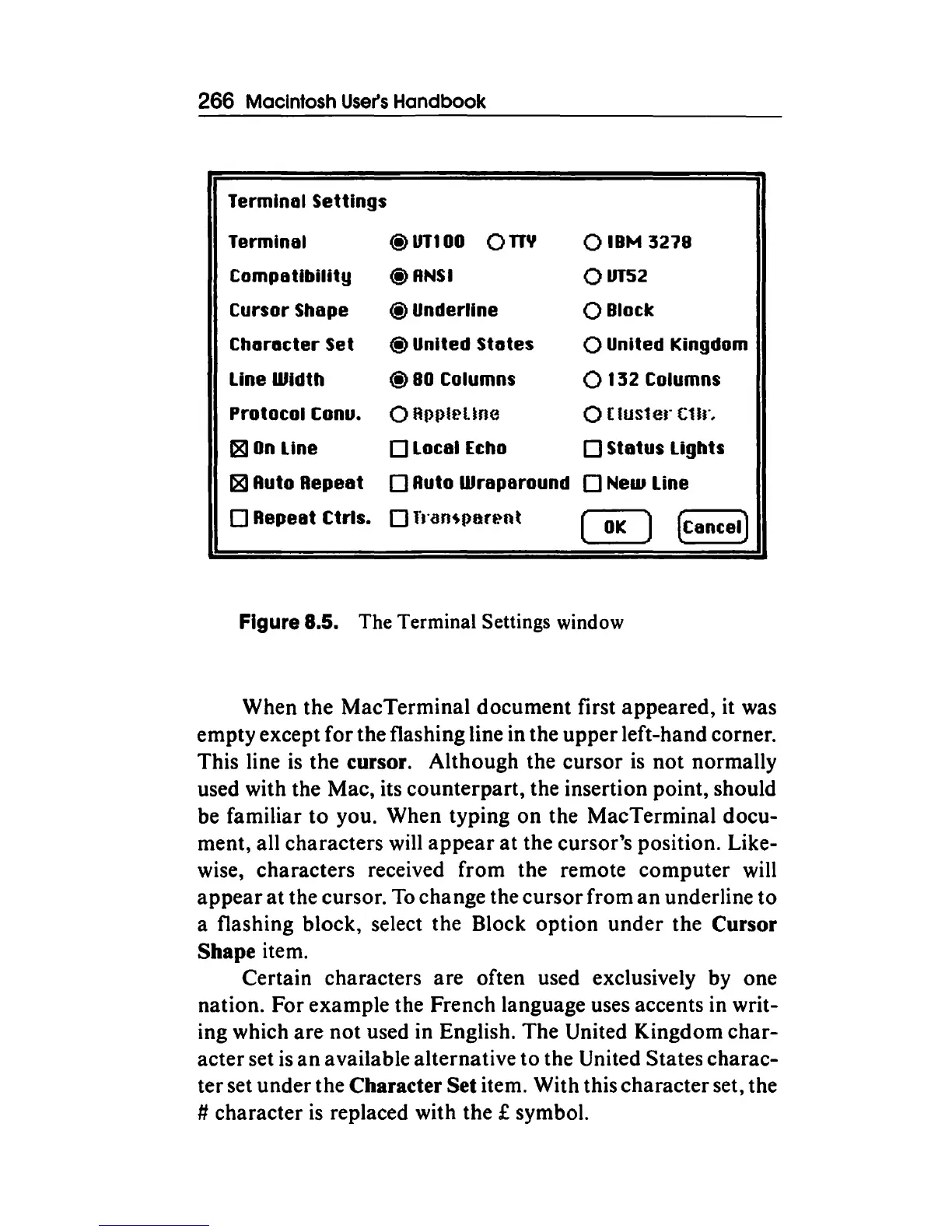
Figure 8.5. The Terminal Settings window
When the MacTerminal document first appeared, it was
empty except for the flashing line in the upper left-hand corner.
This line
is
the cursor. Although the cursor
is
not normally
used with the Mac, its counterpart, the insertion point, should
be familiar
to
you. When typing
on
the MacTerminal docu-
ment, all characters will
appear
at
the cursor's position. Like-
wise, characters received from the remote computer will
appear
at the cursor.
To
change the cursor from
an
underline
to
a flashing block, select the Block
option
under the Cursor
Shape item.
Certain characters are often used exclusively by one
nation. For example the French language uses accents in writ-
ing which are
not
used in English. The United Kingdom
char-
acter set
is
an
available alternative to the United States charac-
ter set under the
Character Set item. With this character set, the
# character is replaced with the £ symbol.



 To Next Page