EasyManua.ls Logo

Apple Macintosh - Page 97

Apple Macintosh
321 pages
Print Icon
To Next Page IconTo Next Page
To Previous Page IconTo Previous Page
Loading...
Using
the
Finder
97
CONTROL
PANEL
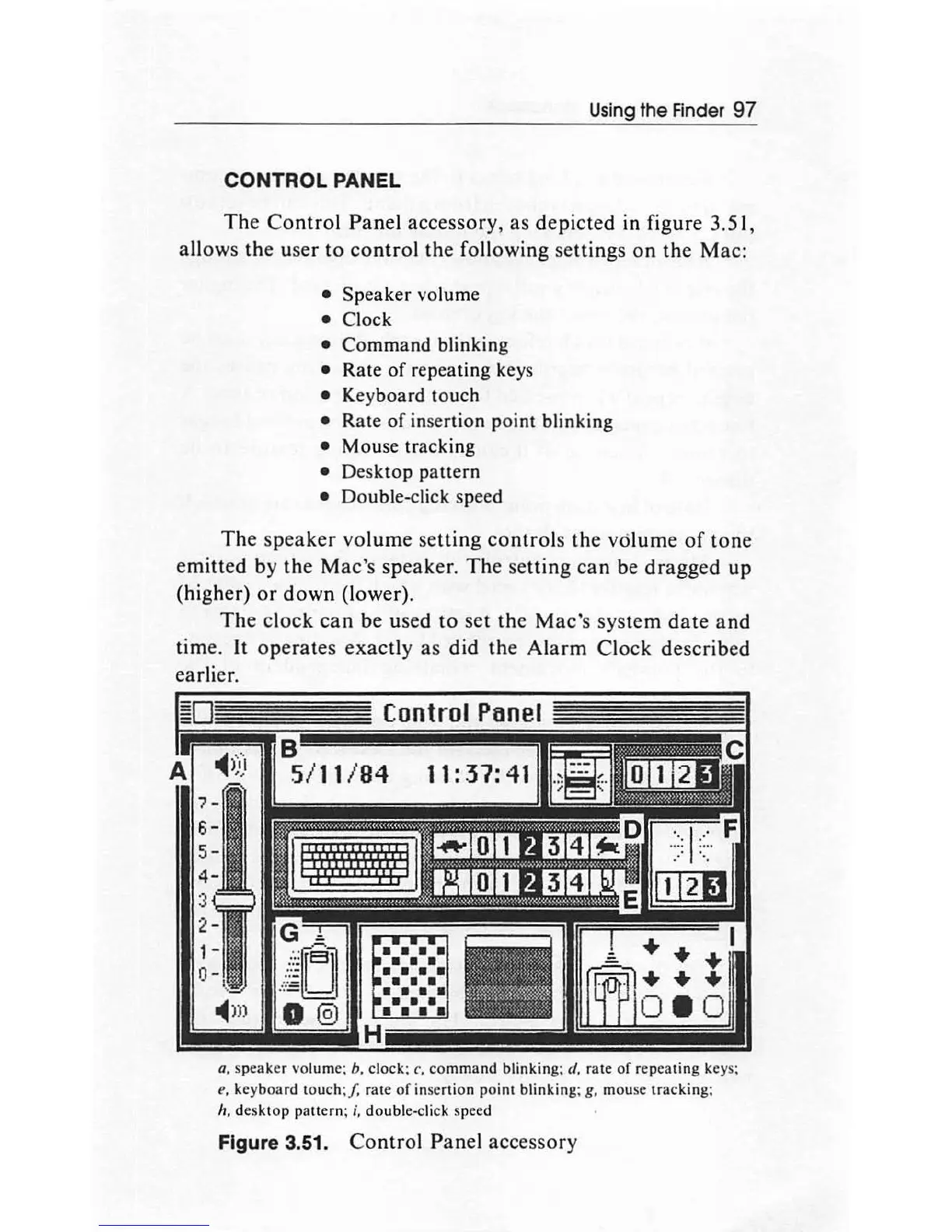
The Control Panel accessory, as depicted in figure 3.51,
allows the user
to
control
the following settings on the Mac:
Speaker
volume
Clock
Command
blinking
Rate
of
repeating keys
Keyboard touch
Rate
of
inse
rtion
point
blinking
Mouse tracking
Desktop
pa
ttern
Double-click speed
The
speaker
volume se
tting
controls
the volume
of
tone
emitted by
the
Mac's
speaker
. The setting
can
be dragged
up
(higher)
or
down
(lower).
The
clock
can
be
used
to
set
the
Mac'
s system
date
and
time.
It
operates exactly
as
did the
Alarm
Clock described
earlier.
Control
Panel
a.
speaker volume; b. clock;
c.
command
blinking;
d.
rate
of
repeating
keys;
e.
keyboard
touch
:/.
rate
of
inse
rtion
point
blinking; g,
mo
use
tracking
;
h.
desktop
pattern; i,
doub
le-c
li
ck
sp
eed
Figure 3.51.
Control
Panel accessory

Other manuals for Apple Macintosh

Related product manuals