Chapter 9 Creating Charts 157
Selecting a Chart Type
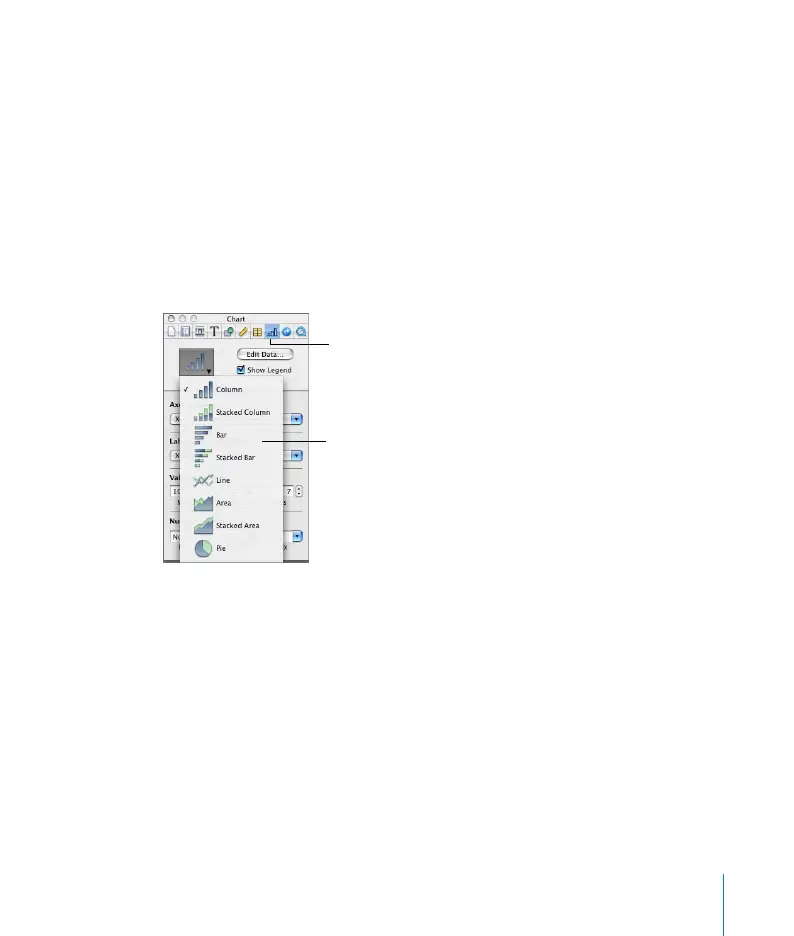
Pages provides eight types of charts to choose from, including bar charts, line charts,
area charts, and pie charts. Once you’ve placed a chart on a page, you can change its
type and format it using the Chart Inspector.
To open the Chart Inspector:
m Choose View > Show Inspector (or click Inspector in the toolbar) and then click the
Chart Inspector button.
To select a chart type, do one of the following:
 Choose Format > Chart > [chart type].
 In the Chart Inspector, choose a chart from the chart type pop-up menu.
Editing Chart Data
To edit chart data, open the Chart Data Editor and enter your data by typing it or by
copying and pasting from Excel, AppleWorks, or other spreadsheet applications.
To open the Chart Data Editor:
1 Select the Chart you want to edit.
2 Choose Format > Chart > Show Data Editor (or click Edit Data in the Chart Inspector).
Choose from eight
different chart types in
the Chart Inspector.
The Chart Inspector
button



 To Next Page