56 Chapter 3 Formatting Text and Paragraphs
To open the Text pane of the Text Inspector:
1 Choose View > Show Inspector (or click Inspector in the toolbar).
2 Click the Text Inspector button, and then click Text.
To align text left, center, right, or justified:
1 Place the cursor in the paragraph you want to change, or select several paragraphs.
2 Click the horizontal alignment buttons at the top of the Text Inspector.
You can align text in a fixed text box to the left, right, center, or justified (aligned to
both the right and left edges). Text in a fixed text box, table cell, or shape can also
“grow” from the top, center, or bottom of the text area.
To grow text from the top, center, or bottom of a text box, table cell, or shape:
1 Select the text box, table cell, or shape you want to change.
2 Click the vertical alignment buttons at the top of the Text Inspector.
To adjust the spacing between lines of text in a paragraph:
1 Place the cursor in the paragraph you want to change, or select several paragraphs.
2 In the Text Inspector, drag the Line slider to adjust the line spacing.
Dragging the slider to the left brings the selected lines closer together; dragging it to
the right moves them farther apart. You can also choose Single, Double, or Multiple
from the Line Spacing pop-up menu. Choosing Multiple lets you set line spacing
values between single and double, or greater than double.
To set precise point values for spacing between the lines of text in a paragraph:
1 Place the cursor in the paragraph you want to change, or select multiple paragraphs.
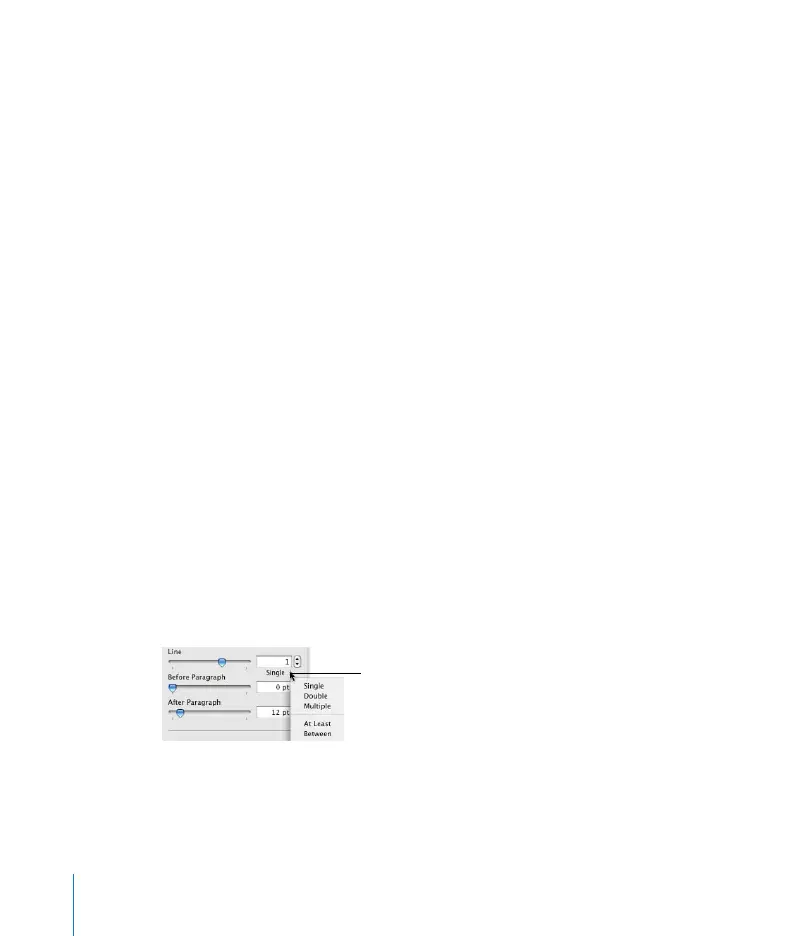
2 In the Text Inspector, choose a standard line spacing (Single, Double, Multiple), or At
Least or Between from the Line Spacing pop-up menu (beneath the Line field).
Click the text beneath the Line
Spacing field and choose a line
spacing option.



 To Next Page