EasyManua.ls Logo

Aprilaire 8353 - User Manual

Aprilaire 8353
12 pages
Print Icon
To Next Page IconTo Next Page
Loading...
1
Installation Guide
IMPORTANT SAFETY INFORMATION WARNING:
Always turn off power at the main power source by unscrewing
fuse or switching circuit breaker to the off position before installing,
removing, cleaning, or servicing thermostat.
Read all of the information in this manual before installing or
programming this thermostat.
This is a 24V AC low-voltage thermostat. Do not install on voltages
higher than 30V AC.
All wiring must conform to local and national building and electrical
codes and ordinances.
Do not short (jumper) across terminals on the gas valve or at the
system control to test installation. This will damage the thermostat
and void the warranty.
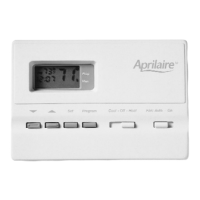
5 - 2 Day Programmable
1 Heat / 1 Cool
Electric / Gas
MODEL 8353
User’s Manual
Installation and
Programming
ELECTRONIC THERMOSTATS
®
Question and Answer IconNeed help?

Do you have a question about the Aprilaire 8353 and is the answer not in the manual?

Summary

Installation Guide

IMPORTANT SAFETY INFORMATION WARNING

Key safety precautions and warnings for installing the thermostat, including power shut-off and voltage limits.

Features

Replacing Existing Thermostat

Installing the Model 8353 Thermostat

Programming Guide

Set Time of Day, Day of Week, Temperature Differential

Guide to setting the current time, day, and adjusting temperature differential for optimal performance.

Changing Fahrenheit (F) to Celsius (C)

Setting Daily Programming

Begin Programmed Operation

Temporary Program Override

Manual Operation

Reset

To Test Thermostat

Troubleshooting

Wiring Diagrams

Limited Warranty

Overview

The Aprilaire Model 8353 is an electronic programmable thermostat designed for controlling 1 Heat/1 Cool electric or gas HVAC systems. It offers a 5-2 day programmable schedule, allowing for customized comfort settings throughout the week.

Function Description:

The thermostat's primary function is to regulate the heating and cooling systems in a building based on programmed schedules and user-defined temperature settings. It can operate in both heating and cooling modes, with an "Off" position for when neither is desired. The fan can be set to "Auto" to run only when heating or cooling is active, or "On" for continuous operation. The 5-2 day programming allows for four distinct setpoints for weekdays (MORN, DAY, EVE, NITE) and two setpoints for weekends (MORN, NITE), optimizing energy usage and comfort. A temporary program override feature allows for short-term adjustments without altering the programmed schedule, automatically returning to the program after four hours or the next scheduled change. Manual operation provides continuous override of programmed settings. The thermostat also includes a low temperature freeze protection feature, which automatically turns on heat if the temperature drops to 40°F (4°C) even if batteries are missing or drained, and an automatic heating shutdown if the temperature exceeds 90°F (32°C) to prevent overheating.

Important Technical Specifications:

  • Programmability: 5-2 Day Programmable (four setpoints for weekdays, two for weekends).
  • System Compatibility: 1 Heat/1 Cool Electric / Gas systems.
  • Voltage: 24V AC low-voltage. Not to be installed on voltages higher than 30V AC.
  • Temperature Range: Programmable from 45°F (4°C) to 90°F (32°C).
  • Accuracy: Within ± 1 degree.
  • Temperature Differential: Adjustable from 1-3 degrees. Factory preset at 1°.
  • Power Source: Two “AA” ENERGIZER brand batteries for program memory retention during power outages.
  • Display: Fahrenheit/Celsius display option.
  • Safety Features: Low temperature freeze protection (heat on at 40°F/4°C), automatic heating shutdown (at 90°F/32°C).
  • Compressor Protection: Built-in 5-minute delay on break for compressor protection.

Usage Features:

  • Programming:
    • Set Time of Day, Day of Week, Temperature Differential: Accessed by pressing and holding SET, then PROG/MAN simultaneously. Use the Up/Down arrows to adjust time, SET to confirm, and then Up/Down arrows to change the day of the week. The temperature differential can also be adjusted here.
    • Setting Daily Programming: Place the COOL-OFF-HEAT switch in the COOL position, press SET, then use the Up/Down arrows to adjust MORN time in 30-minute intervals. Repeat for DAY, EVE, and NITE. Shift the COOL-OFF-HEAT switch to HEAT and repeat the steps for heating settings. Both summer and winter programs use the same time settings.
  • Operation Modes:
    • Programmed Operation: Place the FAN: AUTO-ON switch in AUTO and the COOL-OFF-HEAT switch in either COOL or HEAT (depending on the season). Press the PROG/MAN button until the indicator is in the PROG position.
    • Temporary Program Override: While in programmed mode, press the Up or Down arrow to temporarily increase or decrease the temperature. The thermostat will return to the program at the next scheduled setting change or after four hours.
    • Manual Operation: Press the PROG/MAN button until the indicator is in the MAN position. Use the Up or Down arrows to adjust temperature settings, which will continuously override programmed settings.
  • Display Options: The thermostat can display temperatures in either Fahrenheit or Celsius. This setting is changed by pressing and holding SET, then pressing the Down arrow simultaneously.
  • Low Battery Indicator: A "LO BAT" message will display if the batteries need replacement.

Maintenance Features:

  • Battery Replacement: The thermostat uses two “AA” ENERGIZER brand batteries. A low battery indicator ("LO BAT") will alert the user when replacement is needed. Batteries retain program memory during power outages.
  • Reset Function: A reset button, located to the right of the display, allows the user to restore the thermostat to factory pre-programmed conditions.
  • Troubleshooting Guide: The manual provides a comprehensive troubleshooting section to address common issues such as the thermostat not turning on, frequent cycling, blank display, incorrect program following, or fan operation problems.
  • Installation Guide: Detailed instructions are provided for replacing an existing thermostat and installing the Model 8353, including wiring diagrams for various HVAC system configurations (Heat/Cool 4-Wire Single Transformer, Heat Only 3-Wire Single Transformer, Heat Only 2-Wire Single Transformer, Cool Only 3-Wire Single Transformer, Heat/Cool 5-Wire Two Transformer).
  • Safety Warnings: Emphasizes turning off power at the main source before installation or servicing, not installing on voltages higher than 30V AC, conforming to wiring codes, and avoiding shorting terminals to test installation to prevent damage and voiding the warranty. Also warns against switching to cool mode below 50°F (10°C) to prevent damage or personal injury.

Aprilaire 8353 Specifications

General IconGeneral
BrandAprilaire
Model8353
CategoryThermostat
LanguageEnglish

Related product manuals