EasyManua.ls Logo

Aprilaire 8840 - User Manual

Aprilaire 8840
44 pages
Print Icon
To Next Page IconTo Next Page
Loading...
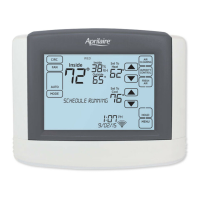
Model 8840 for Meritage
Indoor Air Quality Wi-Fi Thermostat
Owners Manual
Includes Operating Instructions and
Warranty Information
READ AND SAVE THESE INSTRUCTIONS
1

Other manuals for Aprilaire 8840

Questions and Answers

  • E
    efloresAug 14, 2025
    Why is my Aprilaire 8840 Thermostat display blank?
    • A
      Andrea PerezAug 14, 2025
      If the display on your Aprilaire Thermostat is blank, here are a few things you can check: * Ensure the circuit breaker is on and reset it if needed. * Verify the power switch at the heating and cooling system is turned on. * Confirm that the furnace door is closed securely. * Inspect the wiring at the terminal block to ensure the reversing valve is correctly connected, with 'O' active for cooling and 'B' for heating.
  • J
    John SuarezAug 17, 2025
    How to fix Aprilaire 8840 Thermostat if heating equipment is running in cool mode?
    • H
      Heather ClineAug 17, 2025
      If your heating equipment is running in cool mode, verify that the Installer Setting Equipment Type is set correctly to match your installed heating/cooling equipment.
  • W
    weekscarolynAug 21, 2025
    Why does Aprilaire 8840 not display “COOLING”?
    • T
      Timothy McdanielAug 21, 2025
      If your Aprilaire Thermostat is not displaying "COOLING", make sure that the Installer Setting Control Setup is set correctly. Also, try changing the System Mode to Cool and setting the temperature level below the current room temperature.
  • S
    Steven LopezAug 25, 2025
    Why does Aprilaire 8840 not display “HEATING”?
    • P
      pricegabrielleAug 26, 2025
      If your Aprilaire Thermostat is not displaying "HEATING", verify that the Installer Setting Equipment Type is set to match the installed heating/cooling equipment.
  • J
    jessicahooperAug 28, 2025
    What to do if my Aprilaire 8840 Thermostat cooling system does not respond when “COOLING” appears on the screen?
    • T
      Timothy GalvanAug 29, 2025
      If your cooling system isn't responding even when "COOLING" is displayed on your Aprilaire Thermostat, consider the following: * Check for 24VAC at the equipment on the secondary side of the transformer between power and common. If voltage isn't present, investigate the cooling equipment to identify the problem. * Verify 24VAC between the cooling terminal (Y) and the transformer common. If present, the thermostat is working; check the cooling system. * Look for loose or broken wires between the thermostat and the cooling equipment. * Ensure the Installer Setting Control Setup is correctly configured. * Try changing the System Mode to Heat and setting the temperature above the current room temperature.
  • S
    Sheila SullivanSep 1, 2025
    What to do if my Aprilaire Thermostat heating system does not respond when “HEATING” appears on the screen?
    • J
      Jill RomanSep 1, 2025
      If your heating system isn't responding even when "HEATING" is displayed on your Aprilaire Thermostat, consider the following: * Check for 24VAC at the equipment on the secondary side of the transformer between power and common. If voltage isn't present, investigate the heating equipment to identify the problem. * Verify 24VAC between the heat terminal (W) and the transformer common. If present, the thermostat is functional; check the heating equipment. * Look for loose or broken wires between the thermostat and the heating equipment. * Ensure the Installer Setting Equipment Type is set to match the installed heating/cooling equipment. * Make sure heating and cooling wires are not shorted together.
  • T
    Terri TateSep 4, 2025
    Why is my Aprilaire heat pump blowing cool air in heat mode or warm air in cool mode?
    • A
      Anthony MclaughlinSep 5, 2025
      If your heat pump is blowing cool air when it should be heating, or warm air when it should be cooling, check the wiring at the terminal block. Make sure the reversing valve is connected to the correct terminal, with 'O' active during cooling and 'B' active during heating.
  • A
    Austin FreemanSep 9, 2025
    What to do if the fan does not turn on in a call for heat on my Aprilaire 8840?
    • M
      Megan MathisSep 9, 2025
      If the fan isn't turning on when your Aprilaire Thermostat calls for heat, check the Installer Setting Fan Control In Heating / Heat Pump Auxiliary Type. Ensure the fan control is properly configured to match your system type.

Summary

Display Overview

Wi-Fi Setup and Connectivity

Download and Install Aprilaire App

Get the Aprilaire Wi-Fi Thermostat mobile app from the App Store or Google Play.

Create Aprilaire User Account

Register a new Aprilaire account for managing your thermostat remotely.

Connect Thermostat to Home Wi-Fi

Link your thermostat to your home wireless network by selecting your network and entering the password.

Add Thermostat to User Account

Register the thermostat with your user account for remote access and control.

Thermostat Operation and Settings

System Mode and Temperature Control

Select heating/cooling mode and adjust desired temperature setpoints.

Schedule and Hold Functions

Modifying Program Schedules

Change start times, temperatures, and fan modes for daily schedule events.

Temporary and Permanent Holds

Override the programmed schedule with specific temperature settings.

Vacation and Away Mode Settings

Suspend schedules for absences or set parameters for unoccupied homes.

System Status Monitoring

Alerts and Service Reminders

Active Alert Configuration

Set and manage temperature and humidity alerts based on defined limits.

Indoor Air Quality Control

Humidity Level Management

Control home humidity using humidifier or dehumidifier settings.

User Preferences and Customization

Wi-Fi Maintenance and Troubleshooting

Aprilaire 8840 Specifications

General IconGeneral
BrandAprilaire
Model8840
CategoryThermostat
LanguageEnglish

Related product manuals