Need help?
Do you have a question about the Aprilaire 8600 and is the answer not in the manual?
Lists key features like touch screen, message center, programmability, battery access, display info, indicators, fan control, and compressor protection.
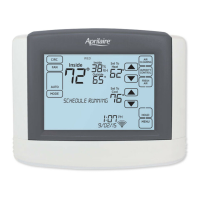
Details the components and indicators visible on the thermostat's main home screen interface.
Describes the controls and navigation within the thermostat's main menu interface.
Explains how to choose the operating mode (Heat, Cool, Auto, Off, Em Heat) for the thermostat.
Guides users on adjusting the desired room temperature setting on the thermostat.
Details how to set the fan operation mode (On, Auto, Circulate) for air circulation.
Provides instructions for safely cleaning the thermostat's touch screen display.
Explains how to interpret and clear maintenance alerts for HVAC service.
Describes how to disable or enable thermostat screen lockout for security or accidental touches.
Instructions for installing batteries for power backup and memory retention.
Step-by-step guide to setting the current time on the thermostat.
Step-by-step guide to setting the current date on the thermostat.
Explains the four daily schedule sections (Wake, Leave, Return, Sleep) and default settings.
Describes the feature that pre-heats or pre-cools to reach target temperature by event start time.
Guides users through modifying event start times and temperatures for daily schedules.
Instructions on how to set the fan mode (On, Auto, Circ) for each programmed event.
Explains how to temporarily override the current schedule with a new temperature setting.
Guides users on permanently holding the current temperature setting, overriding the schedule.
Explains how to set a specific temperature for extended periods away from home.
Details how to specify the end date and time for the vacation hold.
Instructions on accessing the setup menu to modify thermostat configurations.
Explains how to adjust and page through various settings within the setup menu.
Lists and describes available user system settings, including temperature scale and screen lockout.
Information on how to register the thermostat for warranty purposes online or via mail.
The Aprilaire Model 8600 Universal Touch Screen Thermostat is an advanced climate control device designed to offer comprehensive management of your home's heating, cooling, and air quality systems. This owner's manual provides detailed operating instructions and warranty information, ensuring users can fully leverage its capabilities for optimal comfort and energy efficiency.
The Model 8600 thermostat serves as the central control unit for your HVAC system, allowing you to precisely manage indoor temperatures and fan operation. It supports various system modes, including EM Heat (for heat pumps with auxiliary heat), Heat, Off, Cool, and Auto, providing flexibility for different climate control needs. In EM Heat mode, the thermostat controls only auxiliary heat, while the heat pump remains inactive. Heat mode exclusively manages the heating system, and Cool mode focuses on the cooling system. The Off mode deactivates both heating and cooling. If enabled during installation, the Auto mode intelligently switches between heating and cooling based on the indoor temperature, maintaining a comfortable environment without manual intervention.
A key feature of the Model 8600 is its 7-day programmability, which allows for highly customized schedules. Users can set up to four distinct events per day—WAKE, LEAVE, RETURN, and SLEEP—each with its own desired temperature and fan setting. This granular control helps optimize energy consumption by adjusting temperatures when you are away or asleep. For users with simpler needs, the thermostat can also be configured for a two-event schedule (WAKE/OCCUPIED and LEAVE/UNOCCUPIED) or a commercial schedule, providing adaptability for various lifestyles and building types.
The thermostat also incorporates a "Progressive Recovery" feature, which intelligently activates your heating or cooling equipment before a scheduled event to ensure the desired temperature is reached precisely at the start time. For example, if your WAKE event is set for 6:00 AM at 70°F, the thermostat will begin heating earlier to achieve 70°F by 6:00 AM, rather than starting at 6:00 AM and gradually reaching the setpoint.
Beyond temperature control, the Model 8600 offers advanced fan management with ON, AUTO, and CIRC (Circulation) modes. In ON mode, the fan runs continuously, promoting maximum air circulation and filtering. AUTO mode activates the fan only when the heating or cooling system is actively running. CIRC mode, similar to AUTO, ensures the fan runs for at least 20 minutes per hour, balancing energy savings with improved air circulation and cleaning. This programmable fan control allows users to customize airflow based on their preferences for comfort and indoor air quality.
The Model 8600 boasts a large, intuitive touch screen with an adjustable backlight, making it easy to read and operate in various lighting conditions. The backlight can be set to be constantly on or to activate with the first button press and then automatically turn off. The message center on the screen provides helpful feedback and instructions, guiding users through settings and operations.
Setting the time and date is straightforward, accessible through the main menu. Users can easily adjust hours, minutes, months, days, and years. Programming schedules is also designed for user-friendliness. After selecting the desired day(s) for programming, users can set the start times, heat and cool setpoints, and fan modes for each of the four daily events (WAKE, LEAVE, RETURN, SLEEP). The thermostat includes a convenient "COPY" function, allowing users to duplicate a programmed schedule from one day to other days, saving time and effort.
The thermostat offers several program schedule hold options to accommodate temporary changes in your routine. A "Temporary Program Hold" allows you to adjust the temperature for a specific duration, ending at the next scheduled event or a manually set end time. A "Permanent Program Hold" maintains the current temperature setting indefinitely, overriding all programmed events until manually canceled. For longer absences, the "Vacation Program Hold" suspends the programmed schedule for an extended period, maintaining a chosen temperature until a specified end date and time. This energy-saving feature ensures comfort while you're away and automatically resumes your regular schedule upon your return.
To prevent unintended changes, the thermostat includes a "Screen Lockout" feature, which can be configured for partial or full lockout. Partial lockout allows changes to fan mode, system mode, and setpoints, or only setpoints, while full lockout restricts all user interaction. This feature can be overridden by pressing and holding the MENU button for 7 seconds.
The Model 8600 is designed with several features to facilitate maintenance and ensure long-term performance. It displays maintenance reminders for the air filter, humidifier, dehumidifier, and HVAC service, prompting users when equipment is due for attention. These reminders are set up by the installer and can be cleared through the main menu after service is performed.
For cleaning the touch screen, a "Clean Screen" function is available, which temporarily locks the screen for 30 seconds, preventing accidental inputs. It is recommended to use a soft, damp cloth with water or household glass cleaner, avoiding direct spraying of liquids onto the screen.
Battery installation and replacement are made easy with front battery door access. While the thermostat can be AC powered, batteries are optional for providing backup power for the clock in case of a power interruption. The thermostat has a memory backup that retains all settings, but the clock will reset after 90 seconds without battery or AC power. A reset button, located under the battery cover, allows for resetting the thermostat to factory defaults, though this is typically intended for installer use.
The thermostat also includes built-in compressor protection, a vital feature that prevents damage to your heating and cooling equipment by ensuring safe operating cycles. This protection helps extend the lifespan of your HVAC system.
 General
| Product Type | Thermostat |
|---|---|
| Compatibility | HVAC systems |
| Programmability | 7-day programmable |
| Connectivity | Wi-Fi |
| Power Source | 24V AC |
| Display | Color touchscreen |
| Humidity Control | Yes |
| Dehumidification Control | Yes |
| Ventilation Control | Yes |
| IAQ Monitoring | Yes |
| Remote Access | Yes |
| Temperature Control | Yes |
| Wireless | Yes |


 To Next Page