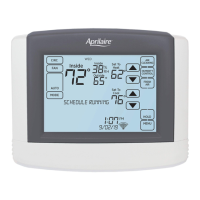
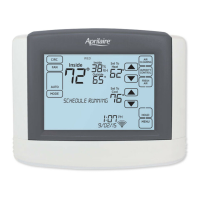
The Aprilaire Model 8620 Thermostat is an advanced control system designed for managing indoor air quality, temperature, and ventilation in residential environments. It features an Event-Based™ Air Cleaning system and offers comprehensive control over humidity or ventilation, depending on the installation. The thermostat is equipped with a large, adjustable-backlight touch screen that provides clear feedback, instructions, and service reminders, making it user-friendly for homeowners.
Function Description:
The primary function of the Model 8620 Thermostat is to provide precise control over various aspects of indoor comfort and air quality. It integrates temperature control with advanced air cleaning, humidification/dehumidification, and ventilation capabilities.
For temperature control, the thermostat supports multiple system modes including EM HEAT (for heat pumps with auxiliary heat), HEAT, OFF, COOL, and AUTO. In AUTO mode, it intelligently switches between heating and cooling based on the indoor temperature. Users can easily adjust the temperature set point using intuitive up/down arrows. The "Heat Blast™" feature allows for a quick increase in room temperature by 3°F to 5°F, providing immediate comfort when needed. The thermostat also supports 7-day programmability, allowing users to set distinct schedules for different days or separate weekday/weekend schedules. These schedules include four main events: WAKE, LEAVE, RETURN, and SLEEP, each with customizable start times and temperature set points. A "Progressive Recovery" feature ensures the desired temperature is reached by the scheduled event time by activating heating or cooling equipment in advance.
Indoor air quality control is a significant aspect of the Model 8620. The Event-Based™ Air Cleaning system offers five modes: Off, Constant Clean, Automatic, Event Clean (3-hour cycle), and Allergies (24-hour cycle). These modes allow users to tailor air cleaning operations to their specific needs, from continuous cleaning to targeted cleaning after events like vacuuming or during allergy season. The thermostat manages fan and air cleaning selections to prevent overlaps.
Humidity control is another key feature, supporting both humidification and dehumidification. For humidification, it can operate in automatic or manual modes. In automatic mode, the thermostat adjusts the home's relative humidity based on outdoor temperature to prevent excess condensation or low humidity. Users can initially set the humidity level and make minor adjustments for personal comfort. In manual mode, users are advised to anticipate outdoor temperature drops and adjust the humidity setting accordingly to avoid condensation, with a provided table guiding recommended relative humidity levels for various outdoor temperatures. For dehumidification, the thermostat can control either a whole-home dehumidifier or the air conditioner. Users can set a desired relative humidity level, and the system will work to maintain it. If dehumidification is done with the air conditioner, the thermostat can cool up to 3°F beyond the cooling setpoint to achieve the desired humidity, though overcooling may not always be sufficient.
Ventilation control, referred to as "Fresh Air," offers four modes: Off, Automatic, 3 Hour Event, and 24 Hour Event. These modes allow for controlled introduction of fresh air into the home, either automatically based on installer-set parameters, for a specific 3-hour period (e.g., after cooking), or for a continuous 24-hour period (e.g., during desirable outdoor conditions).
Usage Features:
The Model 8620 is designed for ease of use with its touch screen interface. The "Home Screen" provides an overview of room temperature, current day, outdoor temperature, room relative humidity, and the current temperature setting. Dedicated buttons for FAN, MODE, AIR CLEANING, HUMIDITY CONTROL, and FRESH AIR allow quick access to different control screens. The "Main Menu" provides access to more advanced settings, including schedule programming, vacation holds, and user system settings.
Program schedules are straightforward to set and modify. Users can select the day(s) for which they want to change the schedule and then adjust the start times, heat/cool set points, and fan mode for each of the four daily events. A "COPY" function simplifies programming by allowing users to duplicate a day's schedule to other days.
The thermostat offers various hold options to override programmed schedules temporarily or permanently. A "Temporary Program Hold" allows users to adjust the temperature until the next scheduled event or until a specified end time. A "Permanent Program Hold" maintains a set temperature indefinitely until cancelled. The "Vacation Program Hold" is an energy-saving feature that suspends the programmed schedule for extended periods, maintaining a specific temperature and optional dehumidification set point until a set end date and time. This is particularly useful for energy savings when away from home.
The "Clean Screen" feature disables the touch screen for 30 seconds, allowing users to clean the display without accidentally changing settings.
Maintenance Features:
The thermostat includes maintenance reminders that alert users when equipment service is due, such as changing air filters or water panels. These reminders are set up by the installer and can be cleared through the setup menu after service is performed.
For power, the thermostat can be battery-powered, AC-powered, or both. When AC-powered, batteries provide backup for the clock. A memory backup retains thermostat settings during power interruptions. The device also includes a reset button under the battery cover to restore factory defaults, though this is intended for installer use only.
The "Setup Menu" allows installers and advanced users to customize various system settings, including temperature scale (Fahrenheit or Celsius), screen lockout levels (Off, Partial, Full), partial lockout types (allowing changes to fan mode, system mode, and set points), maximum temperature and dehumidification set point changes in lockout, number of program events per day, backlight intensity, and daylight savings settings. It also provides options to reset service reminders.


 To Next Page


 Operating Environment
 Power
Power Weight and Dimensions