Notice: Always remove the protection cover prior to turning on the light. Always re-install the cover when packing it away.
-8-
Sizes (L*W*H)
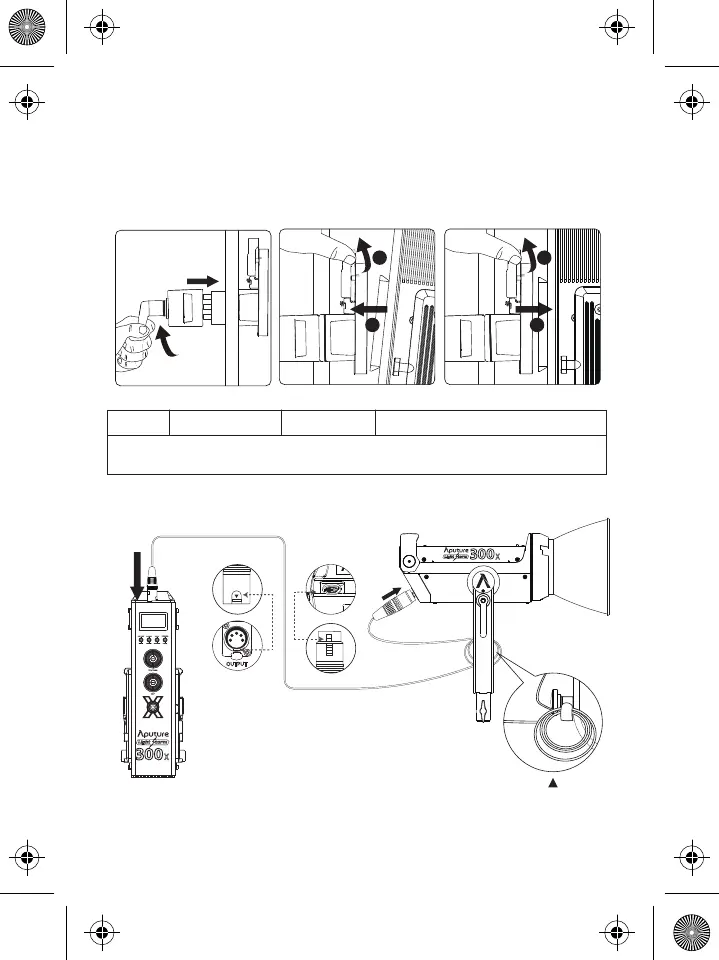
5. Instructions for the Quick-Release "Lightning Clamp"
* Hang the cable from the head cable relief hook
to manage and reduce tension on the cable.
* Disconnect the XLR head cable by pushing down on the locking tabs on the female XLR connectors,
then remove the cable.
6. Connect the light to the control box
XLR Locking Tab
XLR Locking SlotXLR Locking Slot
XLR Locking Tab
Weight
* The Quick-Release "Lightning Clamp" can clamp onto square or round pipe with a
diameter between 2-5cm or 0.79-1.97in.
670g / 1.48lbs 10.35x8.74x12.5cm / 4.07x3.44x4.92in
Specifications
1
2
1
2
1) Clamp the Lightning Clamp onto a light stand.
2) To attach the control box, rotate the release lever to unlock the quick-release
baseplate, then mount the control box onto the Lightning Clamp (the release
lever will automatically spring back).
3) To remove the control box, grasp it firmly, then unlock the quick-release plate by
turning the release lever, and detach the control box.
Connect the light to the control box using the 5-Pin Male-to-Female XLR Head Cable.
ai15858101745_LS_300x Product_Manual_EN.pdf 9 2020/4/2 下午2:49



 To Next Page