
 Need help?
Do you have a question about the Aputure MC Pro and is the answer not in the manual?
Basic safety precautions to follow when using the Aputure MC Pro.
How to turn the MC Pro on/off and charge it via USB Type-C.
Explains the process of charging the MC Pro using the pogo pin charging method.
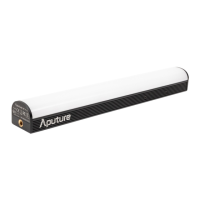
The Aputure MC Pro is a full-color mini LED light designed for cinematographers and lighting professionals, offering a versatile and portable lighting solution. Its robust construction and advanced features make it suitable for fast-paced film sets and a variety of creative lighting scenarios.
The Aputure MC Pro serves as a compact, high-performance LED light capable of producing a wide spectrum of colors. It integrates an IP65 rating, ensuring its durability and resistance to dust and water, making it suitable for use in challenging environments. The light features an integrated battery for portable operation and built-in magnets for quick and flexible mounting on ferrous metal surfaces.
For color control, the MC Pro offers comprehensive options including CCT (Correlated Color Temperature) adjustment, HSI (Hue, Saturation, Intensity) mode, and RGB (Red, Green, Blue) control. It also includes a GEL mode, allowing users to select from ROSCO and LEE filter libraries to simulate various lighting color filters. The Source mode enables users to match the illumination of a scene by selecting from a library of light sources, while the XY mode provides precise control over color coordinates.
The device supports a wide range of special effects (FX) to enhance creative lighting. These include Club Lights, Paparazzi, Lightning, TV, Candle, Fire, Strobe, Explosion, Faulty Bulb, Pulsing, Welding, Cop Car, Colors Chase, Party Lights, and Fireworks. Additionally, it offers Custom FX, allowing users to upload and rename up to 10 custom effects via the Sidus Link app, including Music FX and Picker FX.
Connectivity is a key feature of the MC Pro, supporting both LumenRadio CRMX for advanced wireless DMX control and the innovative Sidus Link mobile app for seamless remote operation. This dual connectivity provides users with flexible control options, whether through a professional DMX setup or a smartphone/tablet.
The MC Pro is designed for ease of use with intuitive manual controls and extensive remote capabilities.
To power the device on or off, users simply press and hold the power button for one second. Charging is facilitated via a USB Type-C port, supporting 5V/2A charging from a charger or power bank. For optimal charging speed, it is recommended to turn off the light while charging, as the charging rate will slow down when the light is powered on. The MC Pro also supports Pogo Pin charging, which is available with the MC Pro 8-Light Production Kit (sold separately). A critical safety note advises against closing the lid of the charging case when it is in an active charging state to prevent overheating.
The integrated magnets allow for quick attachment to ferrous metal surfaces, providing extreme versatility in placement. However, users should ensure the surface temperature is below 80°C to prevent magnet damage and keep the device away from sensitive items like diskettes, credit cards, and medical devices. For more traditional mounting, the MC Pro can be attached using 1/4" Coldshoe Ball Heads, which screw into the device's 1/4" screw mount.
The device features a clear display that shows battery remaining time, wireless connection status, and battery level. The system menu is accessed by pressing the MENU button, and users can navigate through options like Light Mode, Bluetooth Settings, DMX Settings, and System Settings by rotating and pressing the function control knob.
Users can manage Bluetooth connectivity, including turning it on/off (BT Status), resetting the connection (BT Reset) to allow new devices to connect via Sidus Link, and viewing the Bluetooth Unique Identifier (BT UID).
The MC Pro supports wired DMX control via a USB-C to 5-Pin XLR In & Out adapter (sold separately).
The Sidus Link app, available on iOS App Store and Google Play Store, significantly enhances the light's functionality. It provides advanced control over all parameters, including custom FX, and offers a more detailed interface for managing Aputure lights.
Proper maintenance ensures the longevity and optimal performance of the Aputure MC Pro.
When hanging the product overhead, always ensure an extra safety measure, such as a safety chain, is attached and certified for the product's weight.
The product is certified by RoHS, CE, KC, PSE, and FCC. Users should operate the product in full compliance with relevant country standards. Malfunctions caused by incorrect use are not covered by warranty, and the user may be charged for maintenance. The manual's instructions are based on thorough company testing, and design or specification changes may occur without further notice.
 General
| TLCI | ≥98 |
|---|---|
| Control | Sidus Link App |
| Operating Voltage | 5V |
| Power Source | USB-C |
| Mounting Options | 1/4"-20 thread, magnetic back |
| CRI | ≥95 |
| Battery | Built-in rechargeable lithium-ion battery |
| Battery Life | Up to 2 hours (at full power) |












 To Next Page