- 21 -
3.2 Channel Selection
In DMX mode, match the channel of your DMX controller with the light, and then
adjust accordingly.
* The default DMX channel is "001".
* The range of DMX channels is 1 to 512.
4. Controlling Device Via DMX
DMX512
OUTPUT
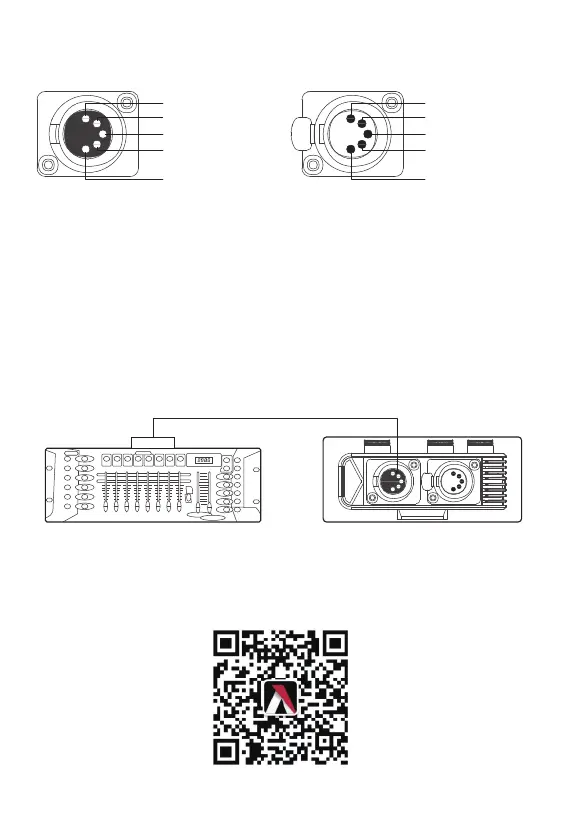
The DMX controller is connected to the control box, as shown in the figure below:
* The DMX interface schematic is shown in the pictures below:
Signal Common
Data 1- (Primary Data Link)
Data 1+ (Primary Data Link)
Data 2+ (Optional Secondary
Data Link)
Data 2- (Optional Secondary
Data Link)
Signal Common
Data 1- (Primary Data Link)
Data 1+ (Primary Data Link)
Data 2+ (Optional Secondary
Data Link)
Data 2- (Optional Secondary
Data Link)
The Nova P600c offers a variety of DMX modes.Please find a detailed overview of all
DMX modes in the document,NOVA P600c DMX Chart is available for free download
on the Aputure official website https://www.aputure.com










 To Next Page