Quartz bath with overflow filler installation instructions Page 13
Run the bath at maximum temperature
(factory pre set to 45°C). If required, maximum
temperature adjustment can be made with a
flat bladed screwdriver using the ‘MAX TEMP
ADJUSTMENT’ control as indicated. When the
temperature has been set to the desired
position, carefully replace the Digital processor
lid and secure the fixing hand tight only.
19
Site conditions can affect temperature settings, installer to adjust as required.
ALL COPPER PIPE WORK MUST BE CROSS-BONDED AND CONNECTED TO A
RELIABLE EARTHING POINT.
!
The Digital processors are supplied factory set
with the flow rate at either ‘NORMAL HP’ or
‘NORMAL GRAVITY’ mode depending on which
shower system has been ordered.
HP/COMBI PROCESSORS ON BALANCED HP
SYSTEMS:
HP/Combi Digital processors fitted to balanced
high pressure systems may be set to ‘NORMAL HP’, or for water economy,
‘ECO’ modes.
HP/COMBI PROCESSORS ON COMBINATION BOILER SYSTEMS:
For HP/Combi Digital processors installed on combi boiler systems, for optimum
performance we recommend setting the flow rate to the ‘COMBI’ mode.
17
N.B. The ‘ECO’ flow rate mode should not be selected for shower systems fitted
to combination boilers.
GRAVITY PUMPED PROCESSORS:
Gravity Pumped Digital processors fitted to gravity systems may be set to
‘NORMAL GRAVITY’, or for water economy, ‘ECO’ flow rate modes.
WHEN MAKING ANY ADJUSTMENT TO THE PROCESSOR SETTINGS THE
POWER MUST BE ISOLATED.
!
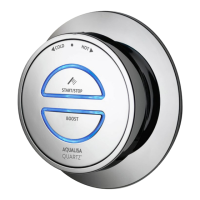
Re-instate the electricity supply to the Digital processor. Press the ‘Start/stop’
button on the controller to turn the bath on.
18


 To Next Page
 Loading...