5
LINKED
Stereo Setup
1
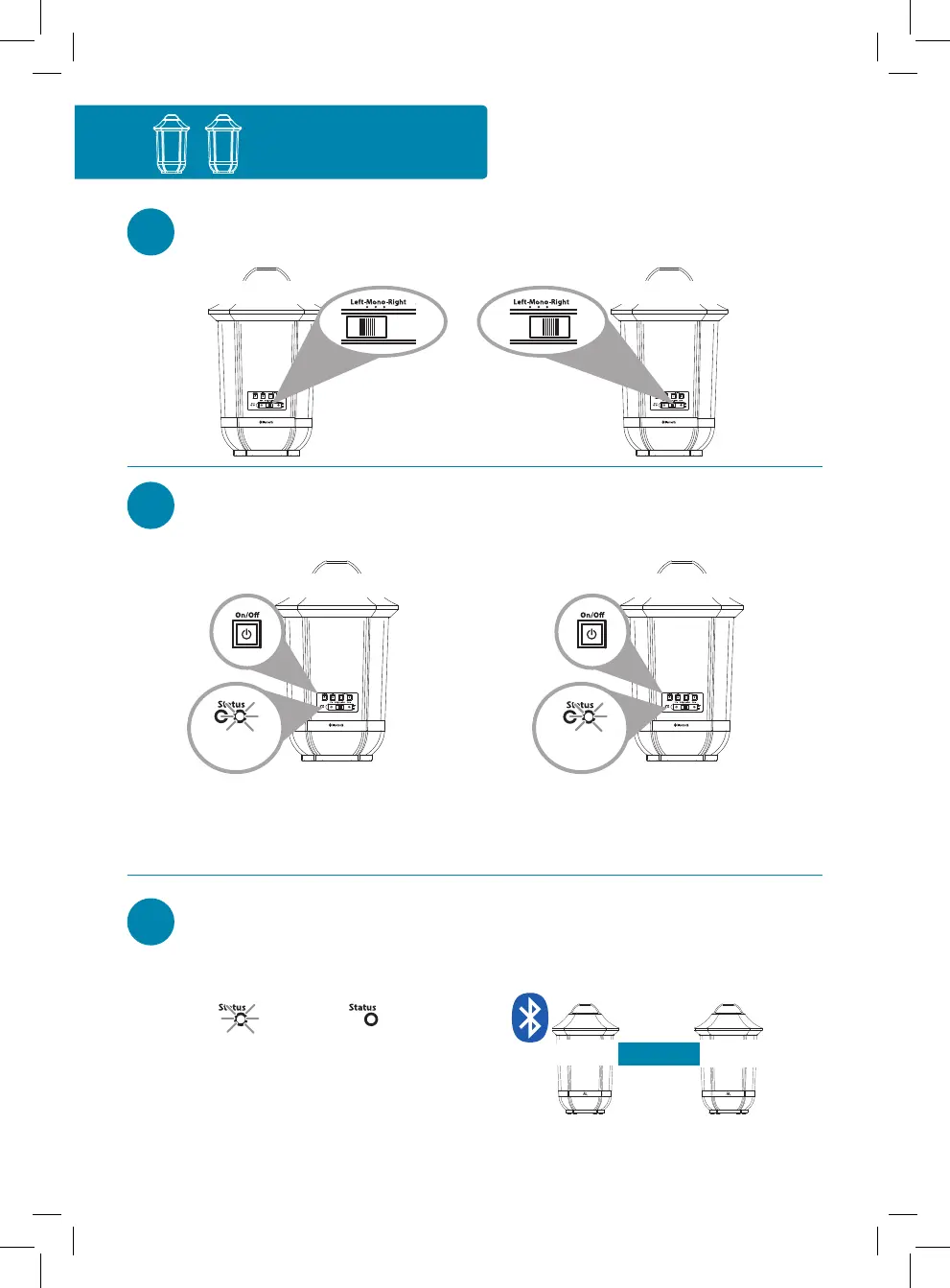
Set the Left-Mono-Right
switch on one speaker to Left.
Set the Left-Mono-Right switch on
the other speaker to Right.
2
Press the On/Off button on the
back of the left speaker to turn
it on.
Press the On/Off button on the back
of the right speaker to turn it on.
The white Status light on the
back of the left speaker blinks
slowly.
The white Status light on the back of
the right speaker blinks slowly.
3
Wait for the speakers to
announce “Left connected” and
“Right connected.”
Right speakerLeft speaker
Blinking white
The white Status light on the
right speaker turns solid white
(this light keeps blinking on the
left speaker).
This means the two speakers are
linked for stereo and ready to pair with
your Bluetooth device.
RIGHT
LEFT
Continues on the next page...
Speaker back Speaker back
Left speaker back
Blinking
white
Right speaker back
Blinking
white
Solid white
If you have two speakers...



 To Next Page