MAINTENANCE 10
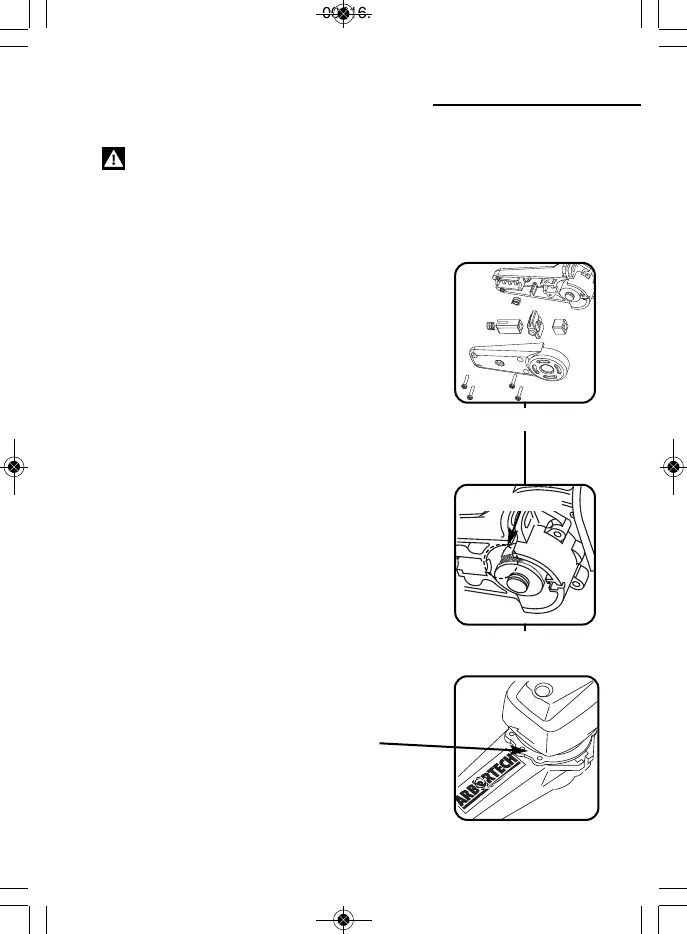
• Checking bushes & springs:
Unplug the Power Chisel. Remove the top
cover. Take care as the springs may fall out (as
shown in fig.11). Check the front and rear bush
are not worn.
(see knowing your tool). If worn, replace using
an Arbortech Power Chisel Service Kit. Replace
only worn components.
Also check that the chisel holding spring, and
button spring are in sound condition.
• Checking the cam:
Unplug the Power Chisel. Remove top cover.
Check that the cam is not worn excessively.(as
shown in fig.12) If wear is greater than 2mm deep
replace using an Arbortech Replacement Cam.
• Exchanging the cam:
Follow the instructions included in the
Arbortech Replacement Cam package.
• Checking adaptor plate
Ensure that the Power Chisel adaptor plate is
always mounted securely. If loose, tighten the
three adaptor plate screws as shown in fig.12a.
Note: The arm must be removed to be able to
tighten screws to adapter.
Fig.11
Fig.12
WARNING: Ensure that the Power Chisel extension arm is always mounted
securely. If loose, ensure that all screws are securely fitted.
Wear on Cam
Fig.12a


 To Next Page