20
U
U
s
s
i
i
n
n
g
g
t
t
h
h
e
e
N
N
o
o
t
t
e
e
b
b
o
o
o
o
k
k
C
C
o
o
m
m
p
p
u
u
t
t
e
e
r
r
A
A
d
d
j
j
u
u
s
s
t
t
i
i
n
n
g
g
t
t
h
h
e
e
L
L
C
C
D
D
S
S
c
c
r
r
e
e
e
e
n
n
D
D
i
i
s
s
p
p
l
l
a
a
y
y
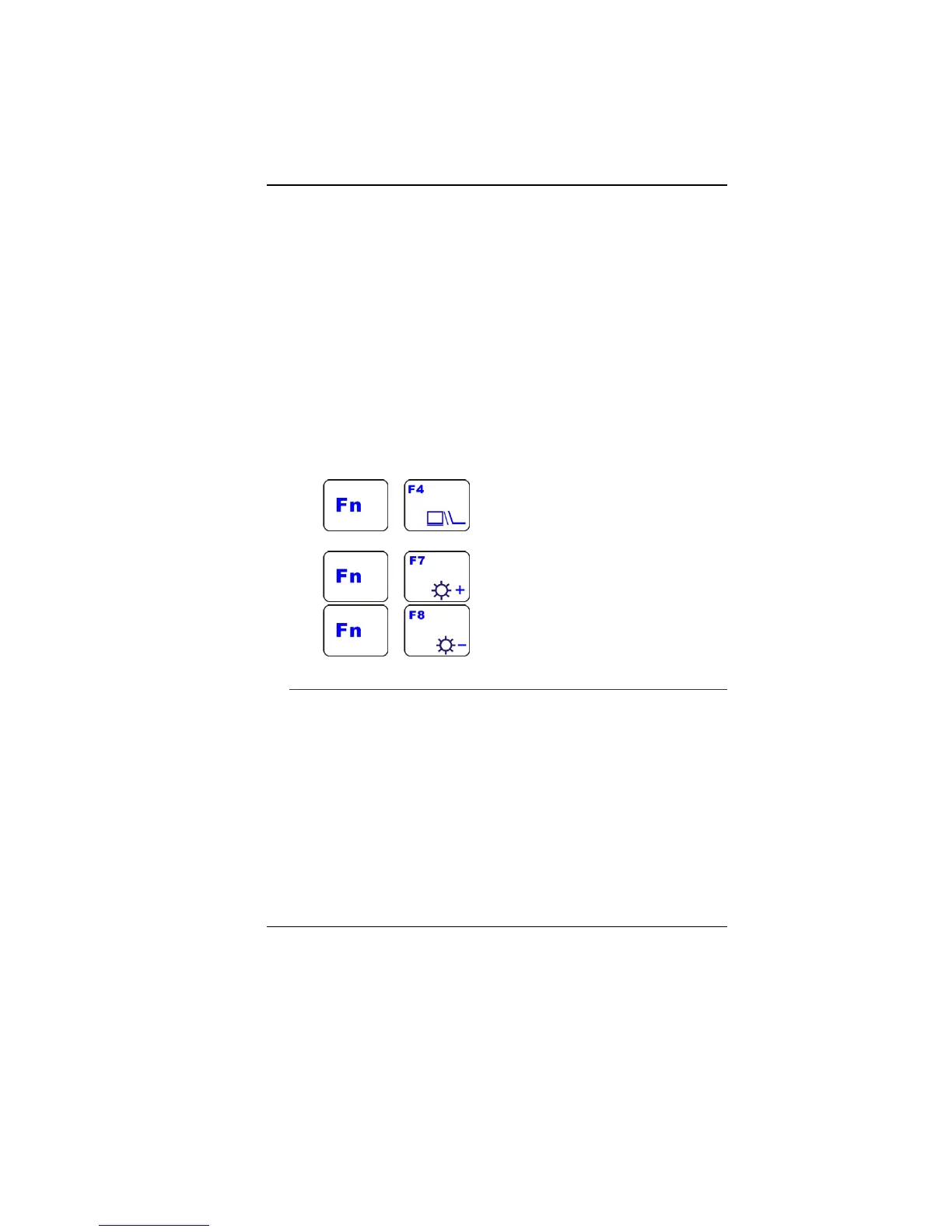
The LCD screen display can be adjusted by the following key
combinations.
+ - Changes Display Mode: LCD-only,
CRT-only, LCD/CRT simultaneously
+ - Increases the brightness level.
+ - Decreases the brightness level.
LCD Care
LCD screens are delicate devices that need careful handling.
Please pay attention to the following precautions:
When you are not using the computer, keep the LCD screen
closed to protect it from dust.
If you need to clean your LCD screen, use a soft tissue to
gently wipe the LCD surface.
Do not put your fingers or sharp objects directly on the surface
and never spray cleaner directly onto the display.
Do not press on, or store any objects on the cover when it is
closed. Doing so may cause the LCD to break.


 To Next Page