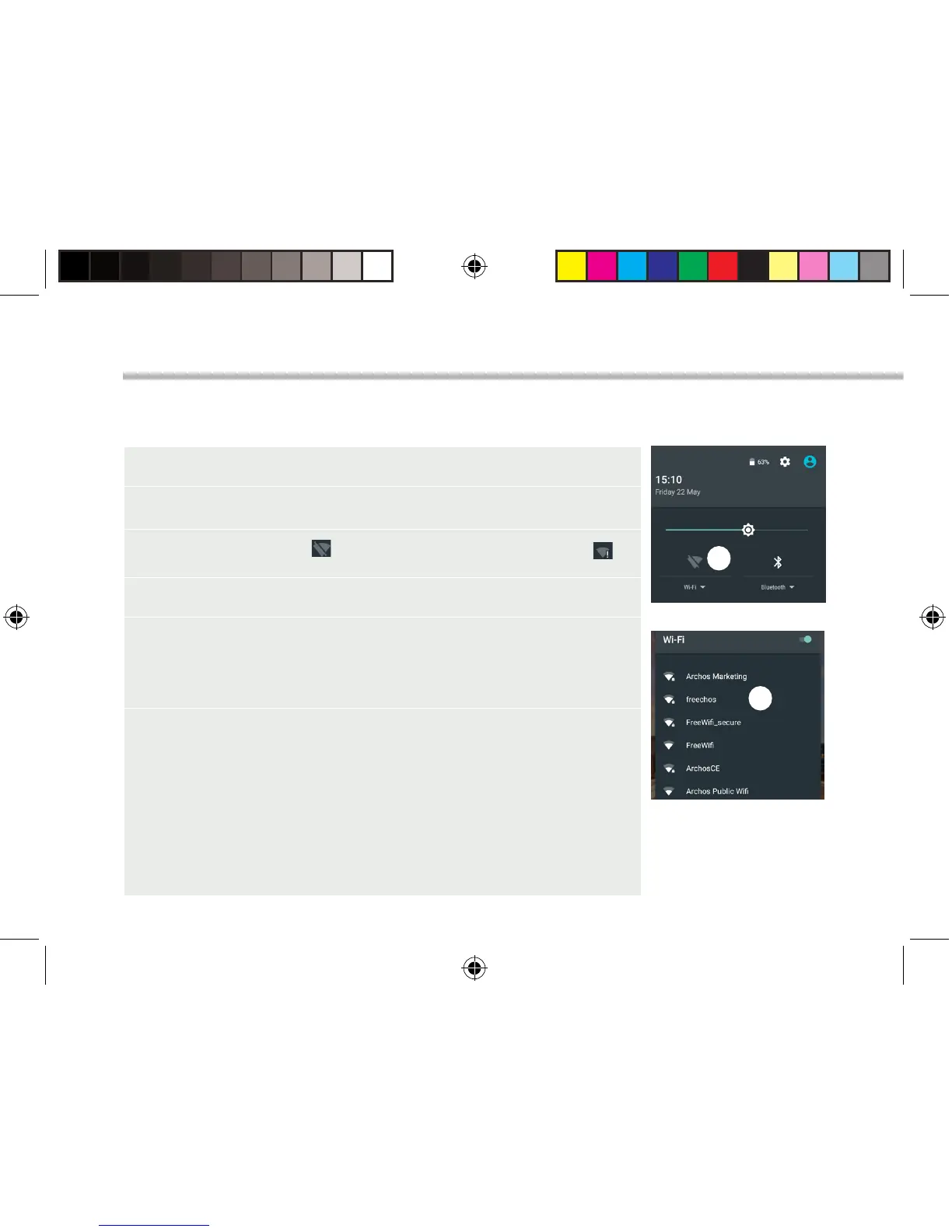
1. Touch and pull down the status bar to display it.
2. Touch again the bar to reveal the quick settings.
3. Select the WiFi icon to activate the WiFi connection .
4. Select “WiFi” below the WiFi icon.
5. Touch the name of network you want to connect to.
Private networks are shown with a lock icon and will require
you to enter your password.
TIPS:
- When entering a WiFi password, we recommend that you select
“Show password” so you can see the characters you are typing. To
get the correct WiFi password (or settings) for the network, contact
the WiFi network provider. If your WiFi is on and you are in range
of a network that you previously connected to, your ARCHOS will
automatically attempt to connect to it.
- To keep your WiFi connection ON when the device is on sleep,
select the Menu icon in the “WiFi” page. Then, select Advanced >
Keep WiFi on during sleep > Always.
Connecting to a WiFi Network
WARNING: Make sure that you are in a WiFi zone.
You can access the WiFi settings quickly from the status bar.
UserGuide_ARCHOS_70_Platinum_book.indd 6 26/06/2015 17:21:02



 To Next Page