MANUAL
V1.0
INTRODUCTION > p. 4
InTrOduCTIOn
arChOs deVICe desCrIPTIOn
BUTTONS
On the left side of the device:
Press and hold to switch on/off.
Press once to switch the display of the image between TV and built-in LCD screen.
Press and hold to lock the buttons of your ARCHOS device.
CONNECTORS
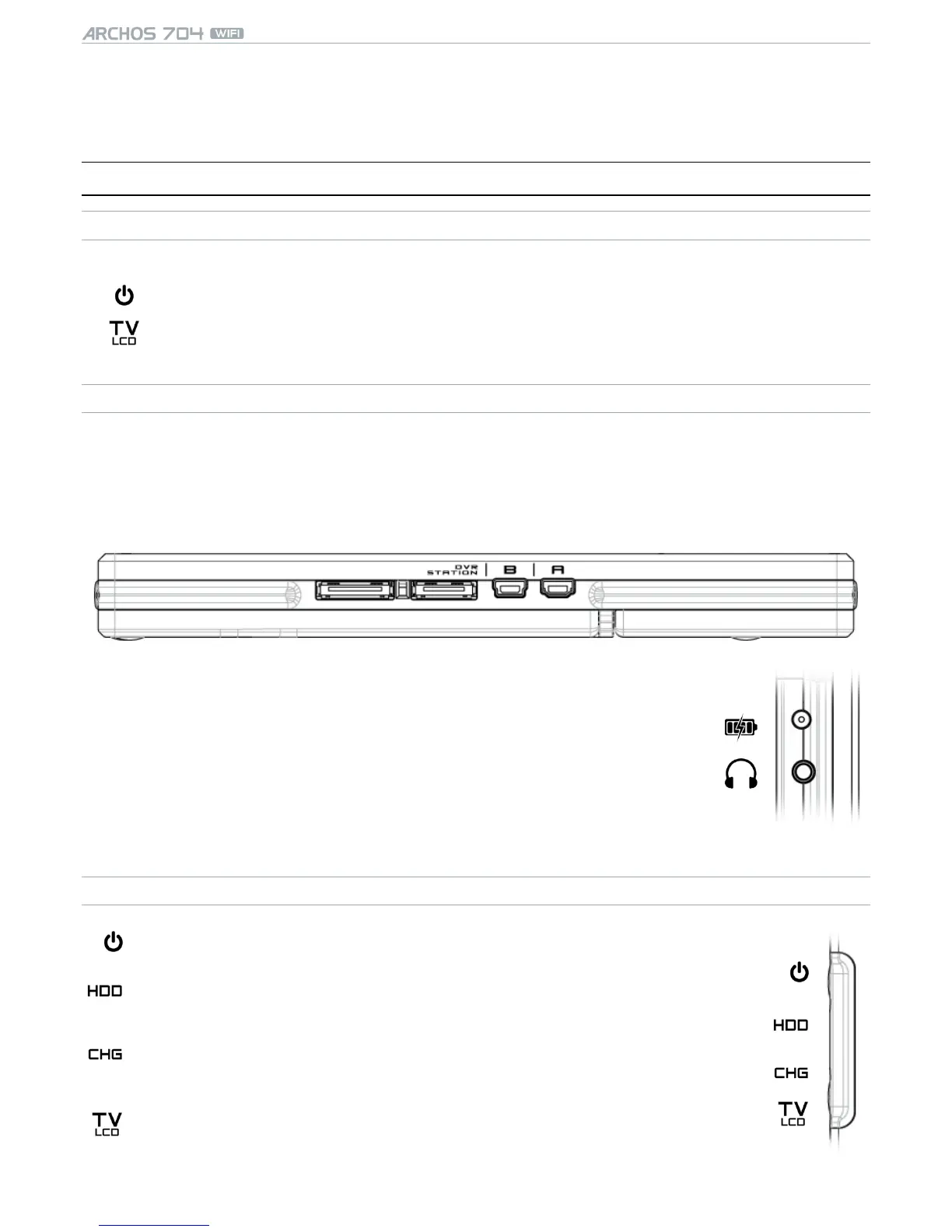
Underneath the device are several connectors:
dVr
sTaTIOn
Record external video and/or audio via the optional DVR Station or DVR Travel Adapter, available
from www.archos.com (see Optional Functionalities).
b
Connect your ARCHOS device to your computer (see Computer Connection).
a
Connect a compatible external device to your ARCHOS (see USB Host Connection).
On the left side of the device:
Power: charge the battery of your ARCHOS device (see Battery Charge).
AV Out Jack:
Audio: plug in headphones.
Video: plug in the ARCHOS AV cable to connect to your TV, hi-, etc.
•
•
a/V
LED INDICATORS
ON/OFF indicator
Hard Disk Drive activity indicator:
the light ickers when the hard drive is active (playing/transferring les).•
Battery charge indicator:
light on: the battery is charging.
ashing: the battery is fully charged.
•
•
Video display indicator:
the light is on when the image is displayed on an external display.•


 To Next Page