5
Set up Camera
What you’ll need:
1. Wi-Fi and a working broadband internet connection with at least 2 Mbps upload
speed.
2. A phone or tablet with iOS 9/Android 5.0 or later.
3. A power outlet.
4. A Phillips screwdriver or power drill with Phillips driver bit.
How the system works
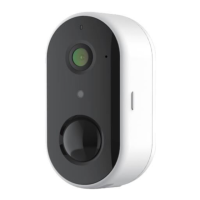
After Wireless GO1 Camera connects with Wi-Fi, allows you to check the view anytime and
anywhere via Arenti APP.
Normally camera will be in sleep mode to reduce the battery consumption, it will wake up
and work when the PIR motion sensor is triggered.
Power on
Find the power key at the camera body side, press and hold it for 5 seconds to star the
Camera, the front network indicator light will on, and flash red slowly means boot up is
finished.
LED Indicator:
Connect Arenti APP
Scan QR code to download and install the Arenti APP. Also, you can search “Arenti” on App
Store (iOS) or Play Store (Android). Download and install Arenti APP. Open APP home page,
Click “+” at the right top page. Follow the guide on the APP to add the camera step by
step.
After connection is successful, the indicator is solid blue.


 To Next Page