4. Connect power to the motor leads provided. See nameplate for proper voltage and frequency.
5. Check the blower for proper rotation. Interchanging any 2 leads on 3-phase model only may
reverse rotation. Check motor nameplate for single phase.
6. On cooling models, connect the pump leads to the appropriate power
supply. See nameplate for the proper motor voltage.
OPTIONAL ACCESSORIES
The interface panel provides pilot duty switching circuits for interlock operation
of exhaust fans with make-up air units for one or two speeds. (See illustration
at right).
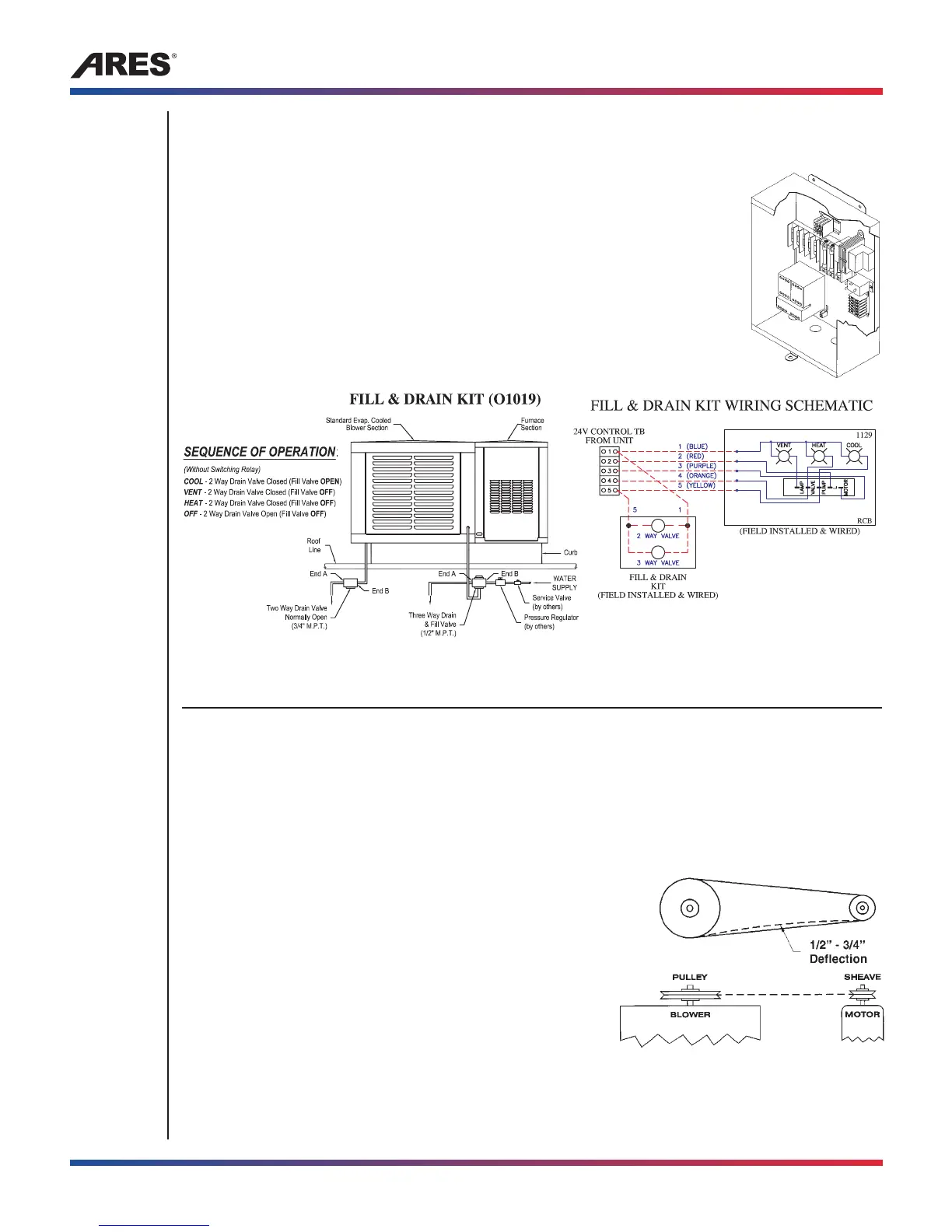
The fill and drain kit provides filling and draining of the sump pan. (See
illustration below)
OPERATION
INITIAL START-UP
1. Check electrical power against the unit’s nameplate.
2. Check airflow through the unit.
3. Re-check that the stand pipe and bleed-off kit have been correctly installed. The adjustable motor
sheave should be adjusted to provide the correct blower wheel RPM to attain the airflow at the
inherent system resistance. Adjust the sheave so the airflow is at or above the minimum shown on
the nameplate. See illustration at right.
4. Check belt tension and alignment. When installing the
belt or adjusting tension, loosen the four motor mounting
bolts and reposition the motor until the belt can be
deflected 1/2" to 3/4" for each foot of belt between the
pulley and sheave. (See illustration at right)
NOTE: Never adjust the belt tension by changing the
setting of the motor sheave. This setting was determined
to provide the correct blower speed for the given CFM
and system static pressure.
5. If ductwork has been installed and unusual static pressure is encountered, the pulley settings may
be changed, providing the blower ampere ratings are not exceeded as indicated on the unit
nameplate.
Make-up Air Blower Model SC1/SC2/SC3, SE1/SE2, DC1/DC2 and DE1/DE2
6
Tel: (800)-288-0892 • www.aresmakeupair.com



 To Next Page