EN - 22
Heated Handles
(Models 921028, 029)
Turn the heated handles
switch to the ON (1)
position to activate. Turn
the switch to the OFF (2)
position to deactivate.
Scraper Blade
The scraper blade allows better contact with
the surface being cleared. It also prevents
damage to the housing from normal usage.
IMPORTANT: DO NOT allow Scraper Blade
to wear too far or Auger/Impeller housing will
become damaged.
Skid Shoes
The skid shoes control the distance between
the scraper blade and the ground. Adjust skid
shoes equally to keep blade level with the
ground. Refer to Pre-Start on page 24 for
recommended settings.
Track Angle
(Model 921023)
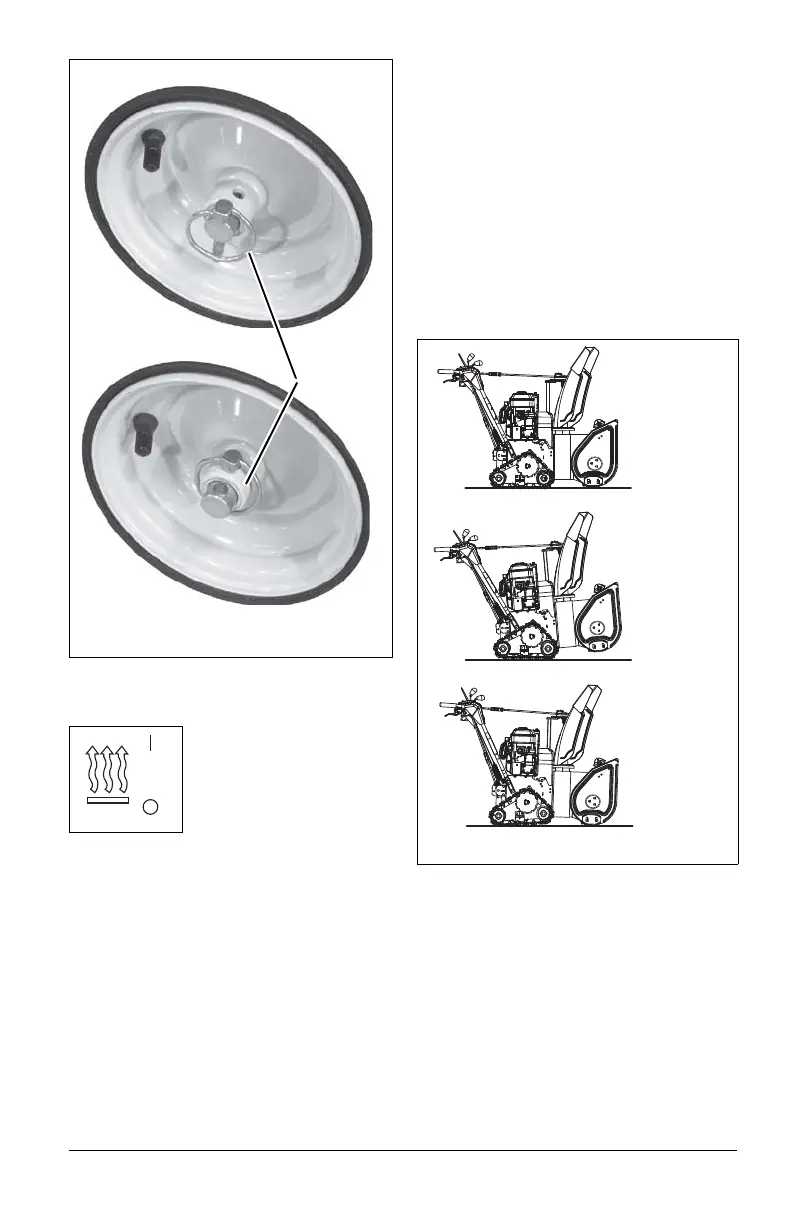
(Figure 23)
The track angle can be adjusted to position
the auger housing for level clearing, deep
cutting or transport.
Squeeze the handlebar trigger and press
down on the handlebars to move the auger
housing into an up position. Release the
trigger to hold the position.
Squeeze the handlebar trigger and lift up on
the handlebars to move the auger housing
into a down position. Release the trigger to
hold the position.
Figure 22
Wheel Unlocked
Wheel Locked
Axle Lock
Pin
Figure 23
Deep Cutting
Transport
Normal



 To Next Page