5 - 24
5.6 CLUTCH YOKE AND FORK
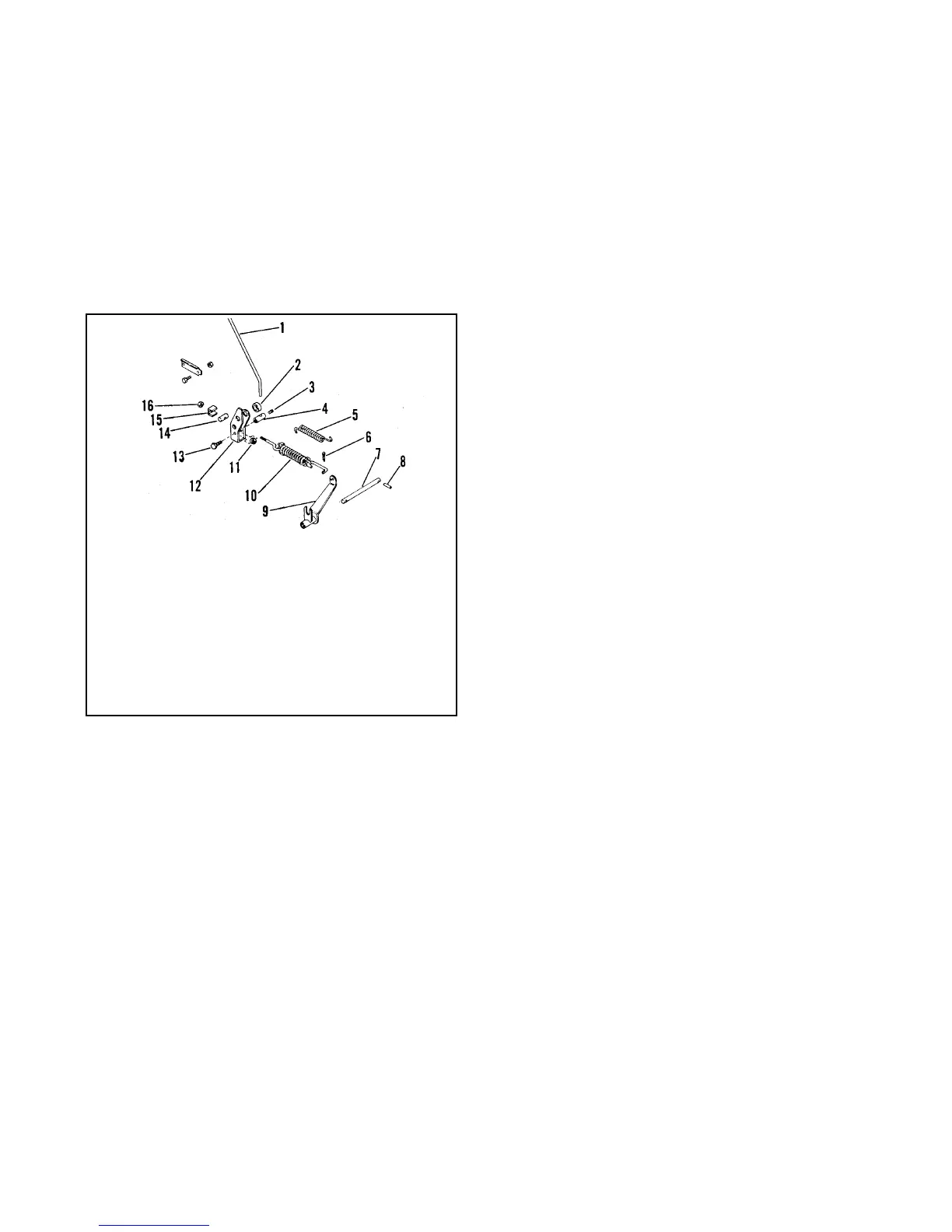
Remove locknut and adapter spacer holding spring
assembly in clutch yoke (Figure 13).
Remove capscrew, nut, and rod adapter from yoke.
Remove cotter pin from end of spring assembly in
clutch fork. Remove spring assembly and extension
spring.
Punch out roll pins holding fork pivot rod in frame and
remove rod and clutch fork.
Check parts for wear or replacement.
Assemble using reverse procedure.
Figure 13
1. Traction Clutch Rod
2. Spacer
3. Setscrew
4. Rod Adapter
5. Extension Spring
6. Cotter Pin
7. Fork Pivot Rod
8. Cotter Pin
9. Clutch Fork
10.Spring Assembly
11.Nut
12.Clutch Yoke
13.Capscrew
14.Adapter
15.Adapter Spacer
16.Lock Nut



 To Next Page