38 /
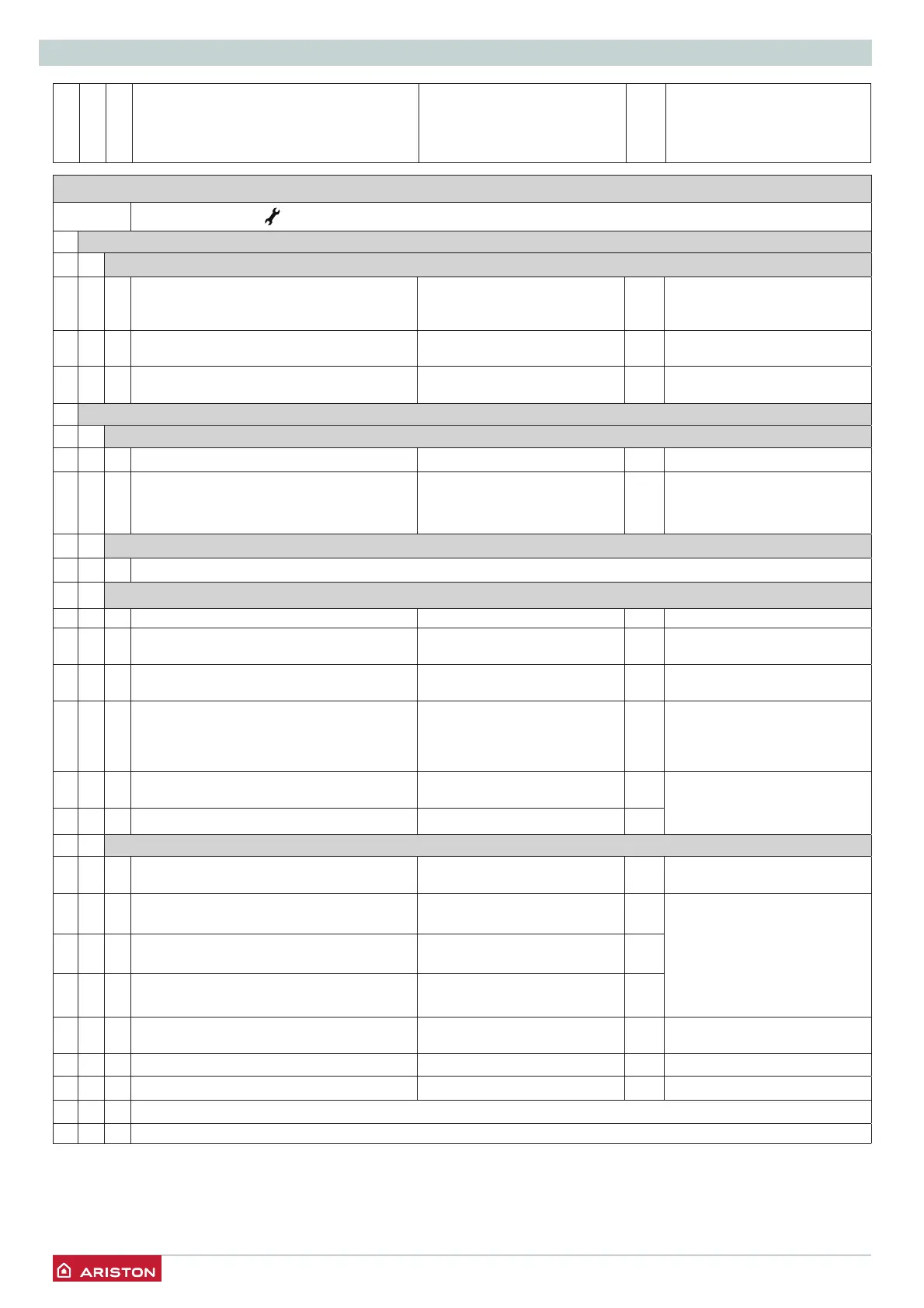
SETTINGS - ADJUSTMENT - PROBLEM IDENTIFICATION MENUS
menu
sub-menu
Parameter
Description value
default setting
SERVICE CODE
Press
the button “+”
to select code 234 and press OK. Turn the encoder to select MENU and press OK button
0 NETWORK
0 4 DISPLAY SETTING
040Zone to be set by display 1 = 1 Zone
2 = 2 Zone
3 = 3 Zone
1
041 Backlight timing
from 0 to 10 (minutes) or 24
(hour)
24
042 Thermoregulation button deactivation 0 = OFF
1 = ON
0
2 BOILER PARAMETER SETTING
20
GENERAL
200
DHW Setpoint Temperature from 36 to 60 (°C) Setting by DHW button 2
201
DHW Pre-heating 0 = OFF
1 = ON
RESERVED FOR TECHNICAL
ASSISTANCE
Only if the PCB is changed
2 1 BOILER PARAMETERS
200
Boiler circulator type (NOT ACTIVE)
2 2 BOILER GENERAL SETTINGS
220Soft ignition from 0 to 90 60 See parag. Gas settings
223Underfl oor thermostat or zone 2 ambient
thermostat selection
0 = Floor safety thermostat
1 = Zone 2 ambient thermostat
0
224Thermoregulation 0 = Absent
1 = Present
0
225Heating ignition delay 0 = Deactivated
1 = 10 seconds
2 = 90 seconds
3 = 210 seconds
0
228Boiler Version - E-COMBI ONE
CANNOT BE MODIFIED
from 0 to 5 0
RESERVED FOR TECHNICAL
ASSISTANCE
Only if the PCB is changed
229Set boiler heat power
2 3 BOILER PARAMETER - PART 1
231 Maximum heating power setting from 0 to 99 60 see the “Gas setting” table,
information on Starting
232Domestic hot water maximum percentage
CANNOT BE MODIFIED
from 0 to 99
RESERVED FOR TECHNICAL
ASSISTANCE
Only if the gas or PCB is
changed
see “gas setting” table
233Minimum percentage
CANNOT BE MODIFIED
from 0 to 99
234Heating maximum percentage
CANNOT BE MODIFIED
from 0 to 99
235Selection of ignition delay type when
heating
0 = Manual
1 = Automatic
1
236Ignition delay when heating timer setting from 0 to 7 (minutes) 3
237 Post-circulation when heating from 0 to 15 minutes or OC (AC) 3
238<Not Available>
239<Not Available>




 To Next Page