This document serves as a comprehensive guide for the Ariston oven, covering its functions, usage, maintenance, and troubleshooting. It emphasizes safety and provides detailed instructions for optimal performance.
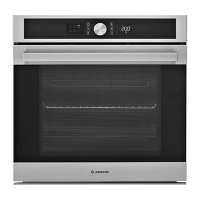
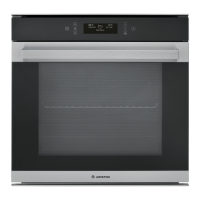
The oven features a control panel with various buttons and a display for easy navigation and setting adjustments. Key controls include an ON/OFF button, a MENU button for quick access to the main menu, and a FAVOURITES button to save and retrieve up to 10 preferred functions. Navigation buttons allow users to move through menus, adjust settings, and confirm selections, while a START button initiates selected functions.
Functions:
The oven offers a wide range of cooking functions, categorized into Traditional and Special Functions.
Traditional Functions:
- FAST PREHEATING: Quickly preheats the oven.
- CONVENTIONAL: Ideal for cooking any dish on a single shelf.
- GRILL: Suitable for grilling steaks, kebabs, sausages, vegetables au gratin, or toasting bread. It's recommended to use a drip tray with 500 ml of water to collect cooking juices when grilling meat.
- TURBO GRILL: Designed for roasting large joints of meat like legs, roast beef, or chicken. A drip tray with 500 ml of water is recommended for collecting juices, and the turnspit (if provided) can be used with this function.
- FORCED AIR: Allows cooking different foods simultaneously on up to three shelves at the same temperature without odor transfer.
- CONVECTION BAKE: For cooking meat or baking cakes with a liquid center on a single shelf.
Special Functions:
- DEFROST: For quick defrosting of food.
- KEEP WARM: Keeps just-cooked food hot and crisp.
- RISING: Aids in the effective rising of sweet or savory dough. It's advised not to use this function if the oven is hot from a previous cooking cycle to maintain proving quality.
- CONVENIENCE: Cooks various dishes quickly and gently, and can also reheat pre-cooked food stored at room temperature or in the refrigerator.
- MAXI COOKING: For cooking large joints of meat (over 2.5 kg). It's recommended to turn the meat during cooking for even browning and baste it to prevent drying.
- FROZEN FOOD: Automatically selects optimal cooking temperature and mode for five types of frozen convenience food (lasagne, pizza, strudel, French fries, bread). A "Custom" setting is available for other frozen products.
- SLOW COOKING: Gently cooks meat and fish, keeping them tender and succulent. Searing roasting joints beforehand is recommended. Cooking times vary based on food type and weight.
- ECO FORCED AIR: For cooking stuffed roasting joints and fillets of meat on a single shelf. It prevents food from drying out through gentle, intermittent air circulation. The ECO light remains off during this function, and the oven door should not be opened until cooking is complete to maximize energy efficiency.
Usage Features:
The guide provides clear instructions for first-time use, including language selection, time setting, and initial oven heating to remove manufacturing odors.
Selecting and Activating a Function:
Users can switch on the oven, navigate the main menu using the navigation buttons, and select desired functions. The display shows the selected function, temperature/grill power, preheating status, duration, end time, and function name. Settings can be modified using the navigation buttons and confirmed with the OK/SELECT button. Once settings are confirmed, the function can be activated by pressing the START button.
Preheating:
The oven can cook with or without a preheating phase. Selecting "No" for preheating reduces overall cooking time and energy consumption. An audible signal indicates when preheating is complete, prompting the user to place food in the oven.
Setting the End Cooking Time (Delayed Start):
Many functions allow users to set an end time for cooking, delaying the start. The display shows the estimated completion time.
Browning:
After cooking, some functions allow for a five-minute browning cycle to crisp the food surface. This can be activated or extended, or stopped by switching off the oven or accessing the main menu.
Fully Automatic Recipes:
The oven includes 28 preset automatic recipes with optimized functions and temperatures. Users can access these recipes from the main menu, select a dish, and the oven will automatically set the cooking parameters. These recipes also allow for setting an end cooking time.
Meat Probe Recipes:
The meat probe measures the core temperature of food during cooking. Users can select "Meat Probe Recipes" from the main menu and choose a dish. The oven suggests optimal temperatures for both the cooking compartment and the probe. Instructions are provided for correct probe insertion, especially for poultry. An audible signal indicates when the desired temperature is reached. The cooking time can be extended if needed, and the oven automatically uses the "Conventional" function. The meat probe can also be used with manual functions to achieve optimal results.
Favourites:
Users can save up to 10 favorite functions with their current settings. This is done by pressing the star button after cooking is complete, then selecting a number for storage. Saved functions can be recalled from the main menu.
Automatic Cleaning - Pyro:
The oven features two pyrolytic self-cleaning cycles: a complete cycle (PYRO) for heavy soiling and a shorter cycle (PYRO EXPRESS) for regular cleaning. The cycles operate at approximately 500 °C, turning food residues into easily wipeable deposits. Before starting, all accessories, including shelf guides, must be removed. The oven door locks automatically during the cycle and remains locked until the temperature returns to a safe level.
Timer:
When the oven is off, it can be used as a timer. The timer flashes on the display, and users can set the desired duration. An audible signal sounds when the timer counts down to zero.
Key Lock:
The keypad can be locked by pressing and holding the OK/SELECT and BACK buttons simultaneously for five seconds. This function can also be activated during cooking.
Maintenance Features:
- General Cleaning: The oven should be cooled before cleaning. Steam cleaners, wire wool, abrasive scourers, or corrosive cleaning agents should not be used as they can damage surfaces. Protective gloves are recommended. The oven must be disconnected from the mains before any maintenance.
- Exterior Surfaces: Clean with a damp microfiber cloth and pH-neutral detergent if needed, then dry. Avoid corrosive or abrasive detergents.
- Interior Surfaces: Clean after each use, preferably while still warm, to remove food residues. Condensation can be wiped away once the oven cools. The door glass can be cleaned with a suitable liquid detergent. The oven door can be removed for easier cleaning.
- Accessories: Soak accessories in washing-up liquid solution after use. Use oven gloves if they are hot, and a washing-up brush or sponge for residue removal.
- Replacing the Light: Disconnect the oven from power, unscrew the light cover, replace the bulb (using specific incandescent or halogen types), and reattach the cover. Reconnect power. Halogen bulbs should not be handled with bare hands.
Troubleshooting:
The guide includes a troubleshooting section for common issues:
- Oven not working: Check for power supply and connection. Restart the oven.
- Door not opening: Could be a door lock fault or cleaning cycle in progress. Restart the oven or wait for the cycle to finish.
- Display shows "F" followed by a number: Indicates a software problem. Contact customer service with the error code.
Removing and Refitting the Door:
Detailed steps are provided for removing the oven door by lowering catches and pulling the door upwards while closing it partially. Refitting involves aligning hinges and securing the upper part, then lowering the catches.
Useful Tips:
- Cooking Table: A table provides recommended functions, accessories, levels, temperatures, and cooking times for various foods. It notes that times are approximate and depend on food amount and accessory type.
- Cooking Different Foods at the Same Time: The "Forced Air" function allows simultaneous cooking of different foods on multiple shelves. Foods with shorter cooking times should be removed first.
The document also provides information on how to download the Use and Care Guide and product fiche from the Ariston website, and how to contact after-sales service.


 To Next Page
 General