ARITERM SWEDEN AB Installation, Operation & Maintenance - 2009.02.18- 11/32
1.
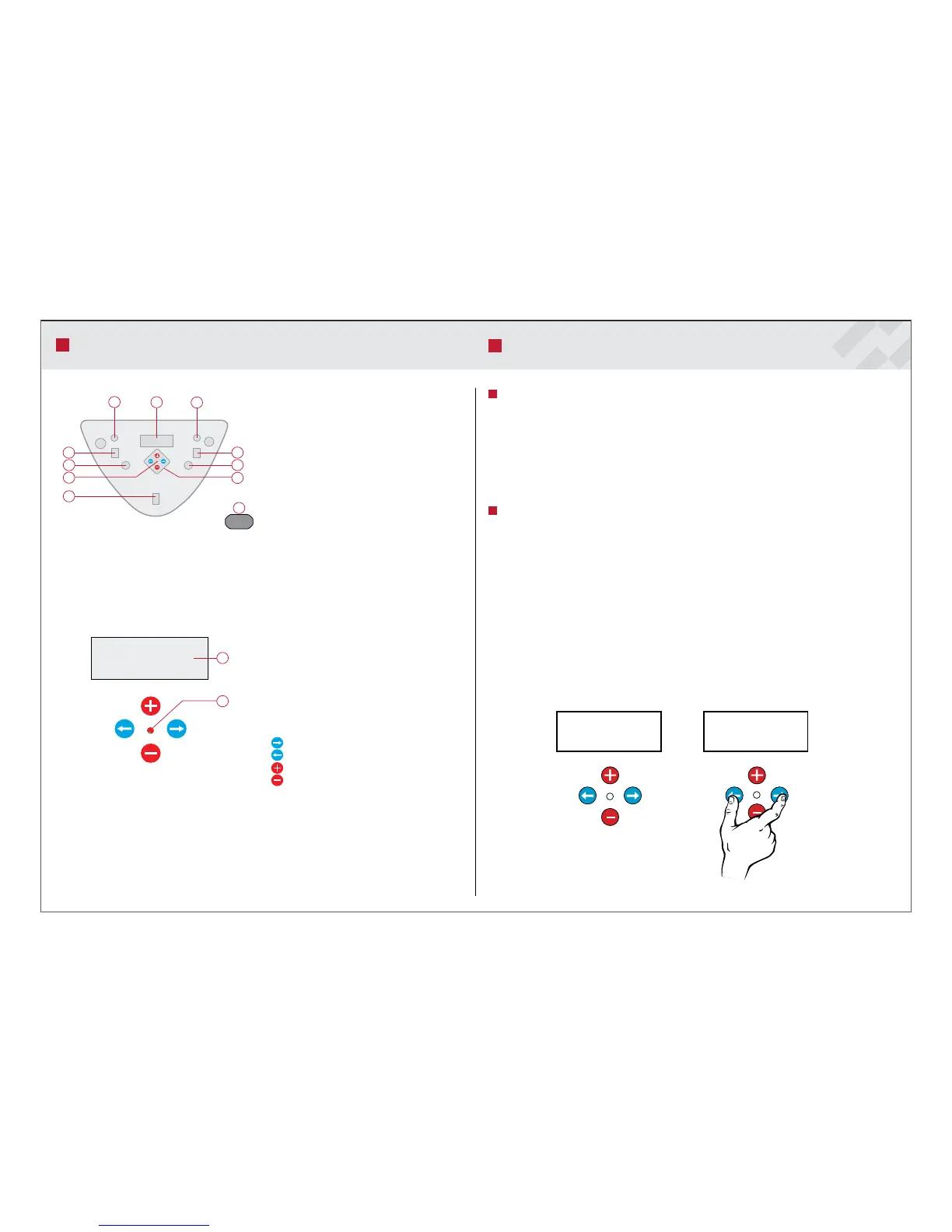
Fuse, circulation pump hot water circuit
2.
Fuse, circulation pump external heating circuit
3.
Switch, circulation pump hot water circuit
4.
Switch, circulation pump external heating circuit
5.
Overheating protection, burner. Reset button for
high limit thermostat
6.
Overheating protection, electric heating element.
Reset button for overheating cut-out
7.
Control unit function keys
8.
Display panel for messages
9.
On/Off switch. Main switch for pellet burner
10.
Indicating light
11.
Connection for external auger
230 V
1
2
1
8
2
3
6
10
9
4
5
7
11
CONTROL PANEL
Default Settings
e settings made at the factory cover most of the control system functions. Normally
only the following adjustments have to be made.:
Selection of operating mode (heat source)
1.
Adjustment of set-point value for boiler temperature (desired temperature of
2.
boiler water).
Programming of desired value for reminder alarm.
3.
Service Levels
e control unit has dierent menu levels for the adjustment and viewing of
the control system parameters. e tables on page 14-17 will give you a detailed
description of the menus shown on the control unit display panel. Normally the
control unit is at menu level 1.
To reach menu level 2 ”Service”, do the following:
Press arrow forward and arrow backward at the same time for 5 seconds. e
•
message ”Service” is shown on the display panel. e control unit is now at the
service menu.
Move forward in the service menu by pressing ”arrow forward” .
•
If you do not press any of the control keys, the control unit will revert to menu 1
automatically after 8 minutes. ere are two more service levels, but they are reserved
for the service technician only.
CONTROL COMPUTER AND MENUS
1. Display for set values
2. Display of operation and active alarms with indi
cation light
Green: Burner in operation
Red: Alarm (burner not in operation)
Flashing: Warning light (does not switch off the
burner)
Browsing forward in the menu
Browsing backward in the menu
Increases the set values
Decreases the set values


 To Next Page